Google Ads Circumventing Systems Suspension: Causes, Fixes, and Appeal Guide 2026
A Google Ads Circumventing Systems suspension means Google believes an advertiser attempted to interfere with, deceive, or bypass its ad-review or policy-enforcement processes. Learn the common causes, what to correct, how to prepare evidence, and how to submit a clear suspended-account appeal.

August 7, 2026
Table of contents
A Circumventing Systems suspension is one of the most serious Google Ads enforcement actions. A successful response begins with a complete audit of the account, website, business identity, technical redirects, and every related account.
Key point: Fix the underlying cause before appealing. A new account, domain, card, or agency arrangement must never be used to evade an existing suspension.
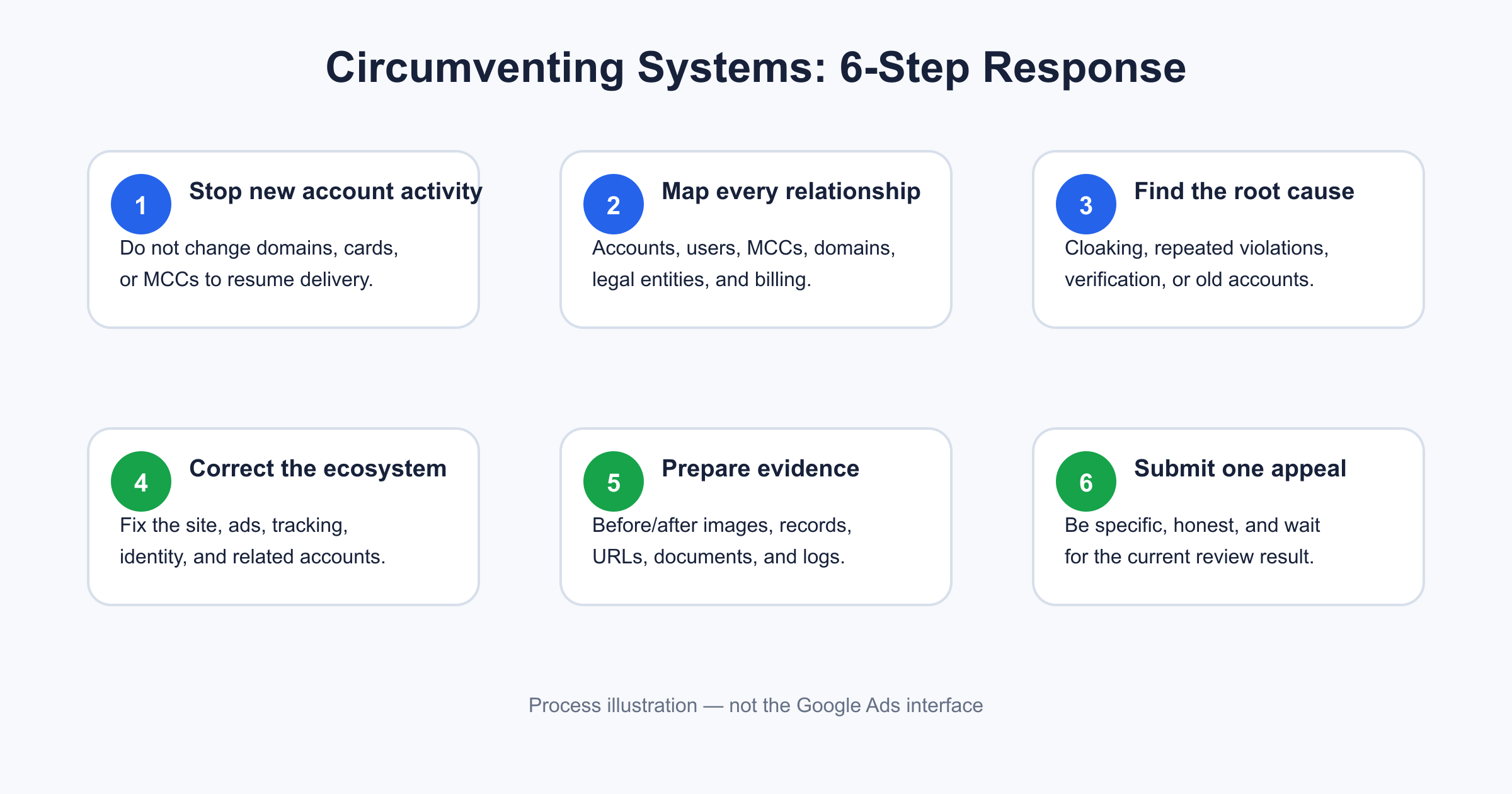
Figure 1. A practical six-step response: stop potentially harmful activity, map account relationships, identify the root cause, correct the full advertising ecosystem, prepare verifiable evidence, and submit one complete appeal.
What is the Google Ads Circumventing Systems policy?
Google's Circumventing Systems policy prohibits practices that circumvent or interfere with its advertising systems and processes, or attempts to do so. Google classifies it as an egregious policy violation, which means an account may be suspended immediately and without prior warning.
According to Google's official Circumventing Systems policy, prohibited conduct can include:
Creating a new Google Ads account after a previous account was suspended.
Producing variations of disapproved ads, domains, or content to bypass enforcement.
Showing Google compliant content while directing users to different or noncompliant content.
Using text, images, video, redirects, or tracking mechanisms to conceal prohibited content.
Submitting false information during advertiser verification.
Repeatedly violating policies across multiple related accounts.
Google may examine the ad, website, account history, related accounts, third-party information, and other signals. The exact detection signal is not always disclosed in the suspension notice.
Why this suspension is especially difficult
When an account is suspended, campaigns stop at once. The business may lose leads and revenue while the owner tries to determine whether the problem came from the website, a former agency, a payment profile, a technical redirect, or an old account that nobody remembered.
The natural reaction is to act quickly. In my experience reviewing suspension cases, that is where many advertisers make the situation worse. They create another account, change the payment card, move the same offer to a different domain, or submit several short appeals within hours.
Those actions may feel like business continuity measures. To an enforcement system, however, they can resemble an attempt to resume advertising while avoiding an active policy decision.
Before appealing, the advertiser must be able to answer four questions:
What exactly happened?
What caused it?
What was changed, where, and when?
What controls now prevent the issue from recurring?
If those answers are not supported by evidence, the account is not ready for an appeal.
Common causes and how to fix each one
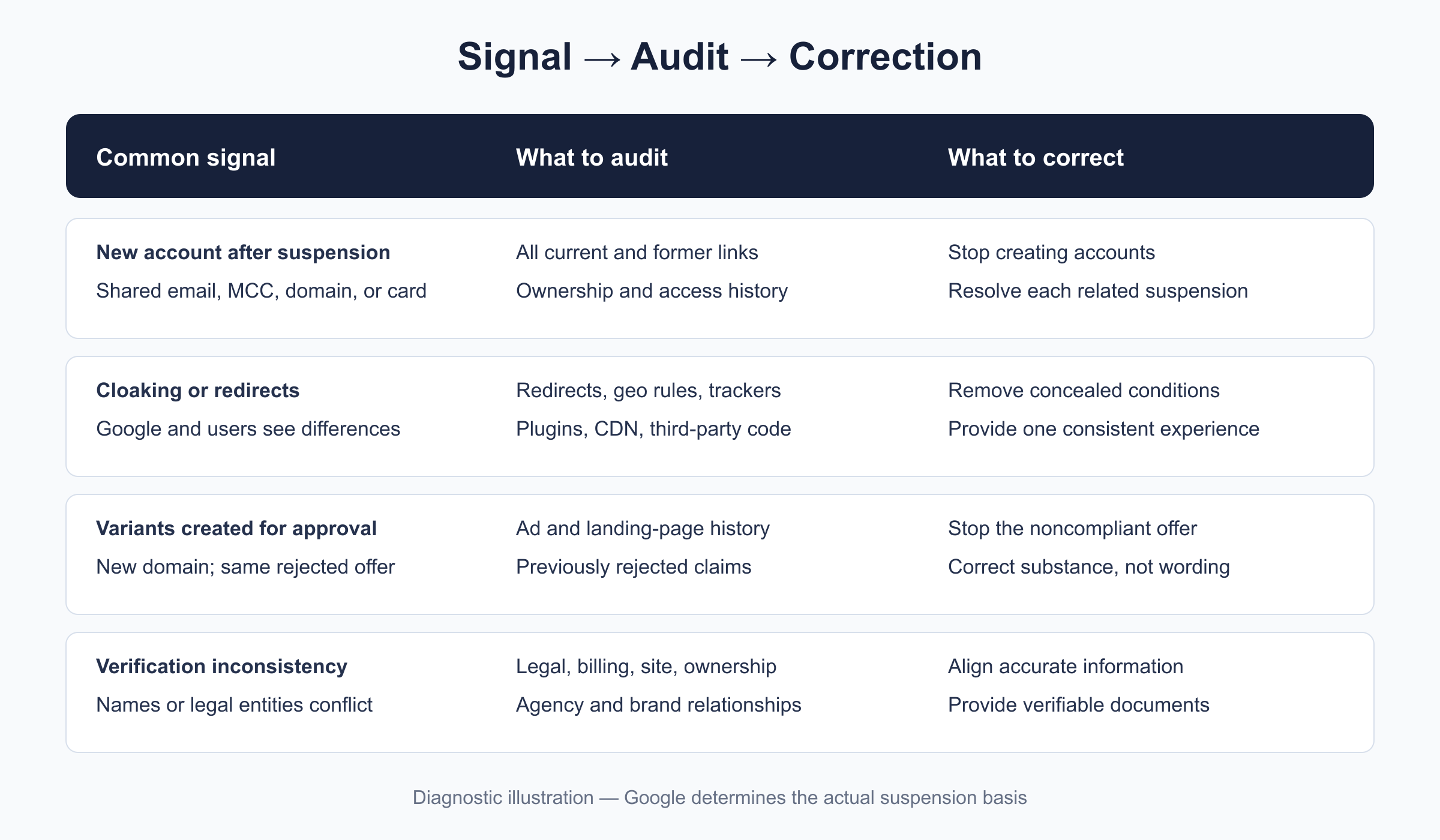
Figure 2. A diagnostic matrix connecting the most common Circumventing Systems signals with the areas advertisers should audit and the corrections they should complete before appealing.
Cause 1: A new account is connected to a previously suspended account
This is one of the most common scenarios. A business creates another Google Ads account after the original account stops serving. The accounts may be connected through administrators, a manager account, a legal entity, a website, a payment method, or historical account access.
What to audit
Every Google Ads customer ID used by the business, its employees, contractors, or agencies.
Current and former account administrators.
Current and previously linked manager accounts.
Domains, brands, products, and payment profiles shared by the accounts.
The status and original suspension reason of each related account.
What to correct
Stop creating or activating additional accounts.
Address the first suspended account and its underlying violation.
Remove obsolete user access where appropriate, while recording why and when it was removed.
If accounts belong to genuinely separate businesses, document their separate ownership, operations, websites, billing, and decision-making structures.
Appeal each suspended account separately if Google requires separate submissions.
Do not hide related accounts. Google specifically advises advertisers to ensure that linked, previously linked, and related accounts comply before appealing.
Cause 2: Cloaking or inconsistent redirects
Cloaking occurs when Google and real users receive materially different content or destinations. It may be deliberate, but it can also arise from misconfigured plugins, fraud-prevention tools, content delivery networks, A/B testing, link trackers, or geographic and device rules.
What to audit
The final URL in every affected ad.
Every server-side and client-side redirect in the path.
Results from different browsers, devices, locations, and traffic sources.
JavaScript redirects, link shorteners, click trackers, and third-party scripts.
WordPress plugins, CDN rules, firewall rules, and personalization software.
Whether search crawlers and users can see the same primary offer and claims.
What to correct
Remove any condition that gives Google and users different policy-relevant content.
Link directly to the true final landing page whenever possible.
Use tracking and redirects only for legitimate measurement, never to conceal the destination or offer.
Test the entire journey on desktop and mobile.
Preserve before-and-after screenshots, redirect maps, change logs, and implementation dates.
An appeal should name the specific tool or configuration that caused the inconsistency. Saying only that “the website has been fixed” is rarely persuasive.
Cause 3: Repackaging disapproved content to pass review
Changing a few words, cloning a landing page, or moving the same offer to another domain does not resolve the underlying issue. If the product, claim, or business model remains noncompliant, repeated variants may appear to be an effort to bypass review.
What to audit
The account's disapproval history.
Every domain and landing page used for the same product or service.
Claims about results, pricing, discounts, certifications, endorsements, or brand relationships.
Hidden content, pop-ups, lead forms, and checkout steps.
Ads or assets created shortly after earlier versions were disapproved.
What to correct
Stop promoting an offer that cannot meet Google Ads policies.
Change the substance of the page, not merely the wording used to trigger another review.
Clearly disclose price, eligibility, limitations, material terms, refund conditions, contact details, and the responsible business entity.
Remove obsolete and noncompliant pages rather than redirecting them to a replacement domain.
Prepare a URL-by-URL record of what was removed or revised.
Cause 4: False or inconsistent advertiser verification information
Google must be able to understand who is advertising, who pays for the ads, who owns the destination, and whether an agency is authorized to act for the business. Conflicting names, addresses, legal entities, or brand relationships create risk.
What to audit
Legal business name, registration details, address, and contact information.
Website ownership and the identity presented on the website.
Payment profile name and the party responsible for billing.
The relationship between the advertiser, agency, and brand owner.
Every document previously submitted during advertiser verification.
What to correct
Align editable website and account information with valid legal documents.
Add clear About, Contact, Privacy, Terms, Shipping, and Refund pages where relevant.
Prepare agency agreements, authorization letters, or brand-relationship documents.
Correct genuine errors using accurate information.
Never alter documents, borrow another entity's identity, or invent details to complete verification.
Cause 5: Multiple related accounts accumulated policy violations
An account may become part of a larger risk pattern when multiple related accounts repeatedly violate advertising policies. The current account might appear compliant in isolation, yet its users, manager account, destinations, or business operation connect it to a broader history.
What to audit
All active, closed, canceled, and suspended accounts connected to the business.
Manager accounts that currently or previously had access.
Agencies and contractors who created campaigns on the advertiser's behalf.
Shared landing pages, tracking templates, feeds, payment profiles, and creative assets.
What to correct
Resolve the compliance status of every account within the advertiser's control.
End access for unauthorized or former partners and document the change.
Create a formal account-ownership and access register.
Explain relationships transparently in the appeal instead of claiming there are no connections.
Pre-appeal audit checklist
Complete this checklist before submitting the appeal:
Read the exact policy named in both the email and account notification.
List every related or previously related Google Ads account.
Stop creating new accounts, domains, and payment profiles to resume delivery.
Confirm that Google and users receive the same policy-relevant content.
Test all URLs, redirects, trackers, plugins, and third-party resources.
Align legal entity, website, billing, and verification information.
Correct or remove previously disapproved ads and landing pages.
Record every material change with its URL, date, and evidence.
Review the compliance of linked and previously linked accounts.
Write a factual appeal without blame, speculation, or unsupported promises.
How to appeal a Google Ads Circumventing Systems suspension
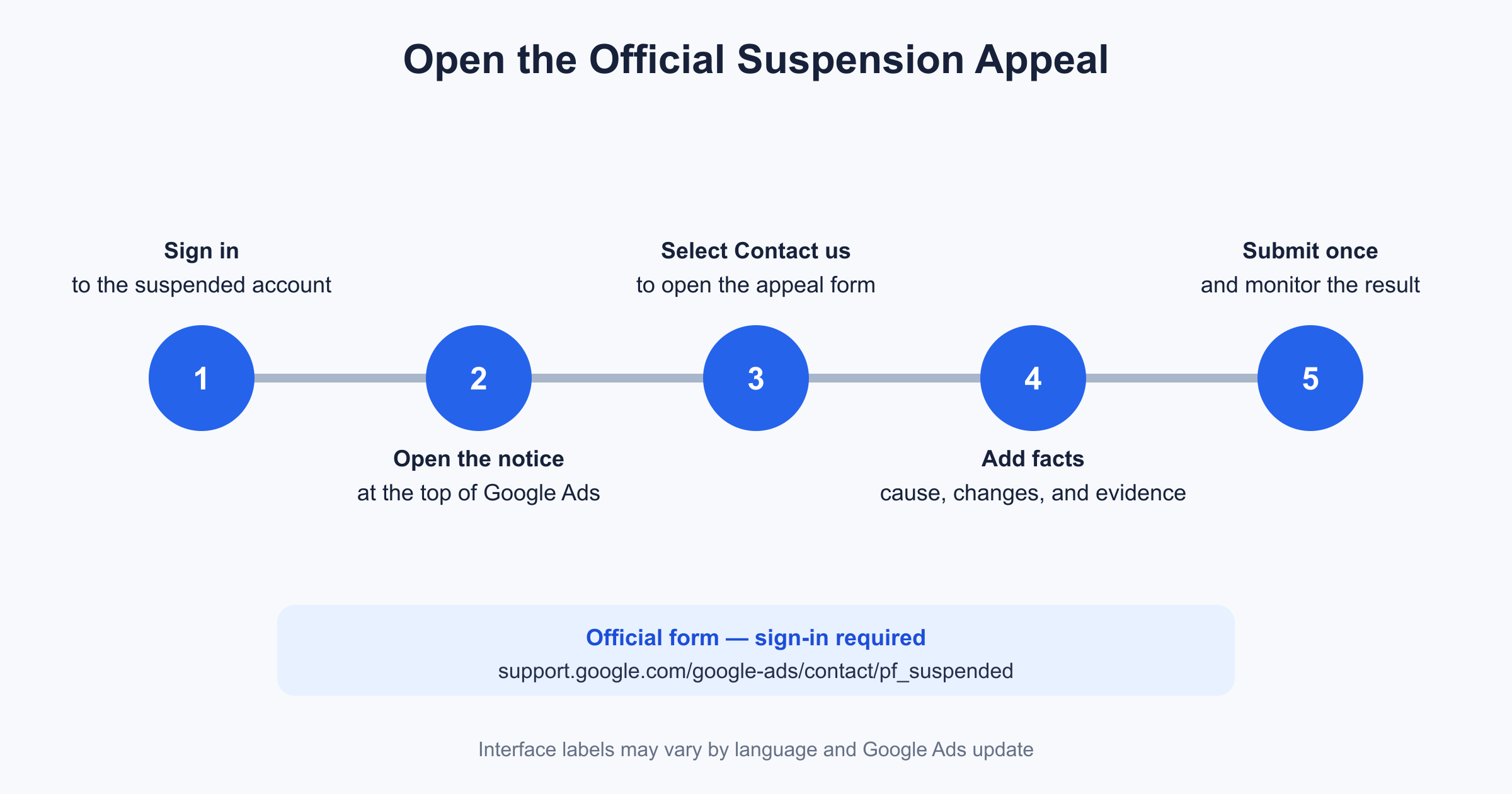
Figure 3. The official appeal journey begins inside the suspended account: open the suspension notice, select “Contact us,” provide accurate facts and evidence, then wait for Google's decision.
Step 1: Sign in to the suspended account
Use an administrator login for the exact Google Ads account that was suspended. Some advertisers must complete identity or payment verification before Google permits an appeal.
Step 2: Open the suspension notification
In Google Ads, select the Contact us link in the notification at the top of the account. Google's current guidance says this opens the appeal form on the right side of the interface.
Step 3: Open the official appeal form
Use the official link below while signed in:
Google Ads suspended account appeal form
The form requires a Google login. Field names and screen positions may vary by language, account type, or interface update.
Step 4: Provide accurate account and business information
Prepare the following:
Google Ads customer ID.
Administrator email address.
Advertising website and legal entity.
A concise description of the business model.
The relationship between the website owner, payer, agency, and brand owner.
A list of related accounts and their current status.
Step 5: Explain the cause, correction, and evidence
Use this structure:
Incident → root cause → corrective action → evidence → preventive control
If the precise cause is not known, explain what was audited and what the evidence shows. Do not invent a cause simply to fill the form.
Step 6: Submit one appeal and monitor the result
Google recommends submitting one appeal at a time. Multiple submissions for the same suspension can slow processing or be treated as duplicates. Google sends the outcome by email.
Google alone controls the review time and reinstatement decision. No consultant, agency, or account provider can guarantee approval.
Google Ads Circumventing Systems appeal template
Use this template only as a structure. Replace every bracketed field and remove any statement that is not true for your account.
Subject: Appeal of Circumventing Systems suspension — Customer ID [XXX-XXX-XXXX]
Dear Google Ads Policy Team,
My name is [full name], and I am the [role] of [legal business name], the owner/authorized operator of Google Ads customer ID [CID]. We received a Circumventing Systems suspension notice on [date].
We reviewed the account, website, user access, payment relationships, redirects, tracking configuration, verification records, and related Google Ads accounts.
Our investigation identified the following issue: [state the specific root cause and how it occurred].
We completed these corrective actions:
[Change, affected URL/account, and completion date].
[Change, affected URL/account, and completion date].
[Change, affected user/tool/configuration, and completion date].
Supporting evidence includes [before-and-after screenshots, redirect records, legal documents, authorization agreement, technical change log, and/or a URL inventory].
We confirm that we are not creating or using another Google Ads account to bypass this suspension. [If another account was created, disclose its customer ID, date, purpose, owner, and current status.] We reviewed the following linked, previously linked, or related accounts: [customer IDs and explanation].
To prevent recurrence, we implemented [policy review procedure, access controls, redirect testing, verification controls, and review schedule].
We respectfully request a new review of customer ID [CID] based on the corrections and evidence above. We are available to provide additional documentation.
Sincerely,
[Full name]
[Role and legal business name]
[Administrator email]
[Customer ID]
How to customize the appeal for each root cause
Root causeWhat the appeal must explainUseful evidencePreviously suspended accountCustomer IDs, ownership, account relationships, and why another account existedAccount inventory, legal records, access map, proof that new activity stoppedCloaking or redirectsThe exact tool, rule, plugin, or code that produced inconsistent destinationsBefore/after redirect chain, test screenshots, change log, plugin or CDN configurationRepackaged disapproved offerWhich ads, URLs, and claims were affected and what substantive change was madeRemoved URL list, revised disclosures, before/after pages, offer documentationVerification mismatchThe real legal entity, payer, website owner, agency, and brand relationshipRegistration documents, contract, authorization letter, consistent website detailsIncorrect associationEvery possible connection and why the businesses are operationally independentOwnership evidence, termination agreement, access history, separate legal records
What not to write in the appeal
Avoid statements such as:
“I did nothing wrong. Reinstate the account immediately.”
“I did not know the policy, so please make an exception.”
“If this account is not restored, I will create another one.”
“Everything has been fixed,” without identifying the changes or evidence.
“My agency account cannot be suspended.”
“We guarantee this will never happen again,” without preventive controls.
A strong appeal is not an emotional argument. It is a concise, verifiable incident report.
Personal Google Ads account vs. agency-managed account
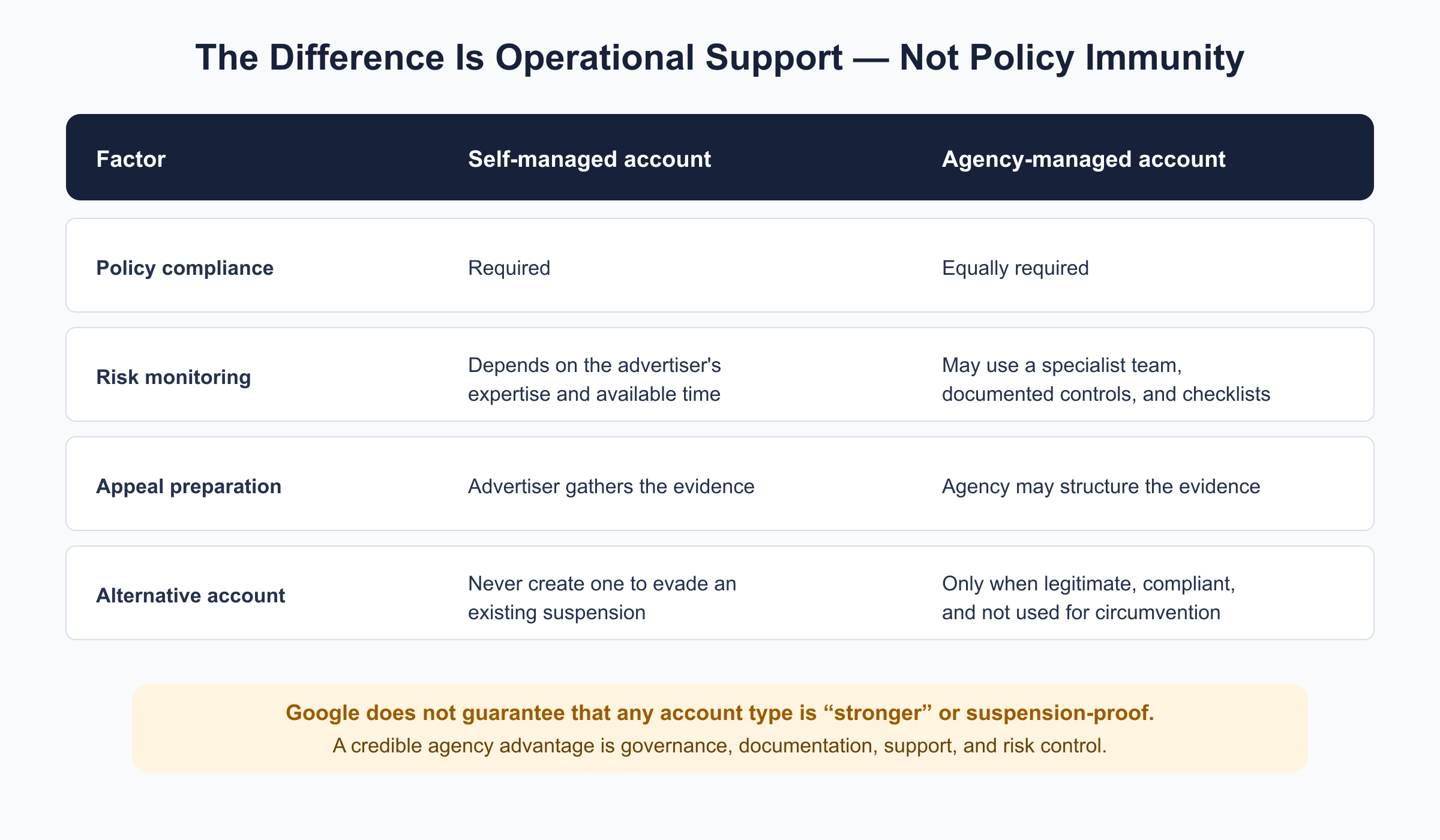
Figure 4. Agency management may improve governance, documentation, policy monitoring, and appeal support, but every Google Ads account remains subject to the same policies and enforcement standards.
All Google Ads accounts are subject to the same policies. An agency-managed account is not exempt from review, disapproval, or suspension. The defensible advantage of a capable agency is operational support—not immunity from enforcement.
FactorSelf-managed accountAgency-managed accountPolicy obligationsFull compliance requiredThe same full compliance requiredPolicy monitoringManaged by the advertiserMay be supported by a dedicated team and checklistAccess governanceOften simple but may be undocumentedCan be standardized through ownership and access recordsWebsite and tracking reviewDepends on internal expertiseMay include structured technical and policy auditsAppeal preparationAdvertiser investigates and writes the appealAgency may help organize facts and evidenceSuspension riskExists when policies are violatedStill exists when policies are violatedReinstatement authorityGoogleGoogle
When people describe an agency account as “stronger,” the term should mean that the account may benefit from better governance, monitoring, documentation, and support. It must not imply privileged enforcement treatment or guaranteed reinstatement.
How Adshow.net supports advertisers
Adshow.net provides Google Ads agency account solutions and account-management support designed to help advertisers operate within platform rules.
For a Circumventing Systems suspension, Adshow.net can:
Provide an initial support response within 24 hours.
Review account structure, access, websites, URLs, redirects, tracking, and potential account relationships.
Guide the advertiser through policy-compliant corrections.
Help organize evidence and prepare a fact-based appeal.
Monitor the case and explain the next step after Google's response.
Consider an alternative account only when it is legitimate, policy-compliant, and not intended to evade an active suspension.
Important disclosure: The 24-hour commitment refers to Adshow.net's initial support response—not Google's review or reinstatement time. Google alone determines whether and when an account is restored.
An agency can reduce operational uncertainty by maintaining records, applying review checklists, and helping the advertiser prepare a coherent case. The customer must still provide truthful information and correct every underlying issue. No agency can legitimately make cloaking, false verification, or suspension evasion compliant.
Frequently asked questions
Can a Circumventing Systems suspension be reversed?
Yes, but only when Google accepts the appeal and reinstates the account. The advertiser should demonstrate that the decision was mistaken or provide a credible explanation, completed corrections, evidence, and preventive controls. Reinstatement is never guaranteed.
Should I create a new Google Ads account after the suspension?
No. Creating another account to continue advertising after a suspension is specifically identified by Google as prohibited circumvention. Related and newly created accounts may also be suspended.
Should I change my domain or payment card?
Do not change them to avoid the suspension signal. A legitimate business change should be documented and must not conceal the same noncompliant activity.
How long does a Google Ads suspension appeal take?
There is no guaranteed review time for every case. Timing depends on the account, verification requirements, evidence, and complexity. Adshow.net's 24-hour support response does not determine Google's review time.
Can an agency account bypass a Google Ads suspension?
No. An agency account must comply with the same policies. Using one to evade a suspension can create additional risk for the advertiser and related accounts.
What if my first appeal is rejected?
Review Google's response, investigate the full account ecosystem again, and submit another appeal only when you have a meaningful correction, clarification, or new evidence. Repeatedly sending the same appeal is not a sound strategy.
Does Google review only the suspended account?
No. Google states that it may consider ads, websites, accounts, third-party sources, and linked or related accounts. Advertisers should review their entire operational footprint before appealing.
Final recommendation
A Circumventing Systems suspension cannot be resolved sustainably by finding another route around enforcement. The correct approach is to map every relationship, eliminate misleading technical behavior, correct the business and identity information, document each change, and submit one honest appeal.
Adshow.net can provide an initial support response within 24 hours, guide the compliance review, and help structure the appeal. Google retains complete control over review timing and reinstatement.