How Facebook Accounts Get Hacked: AdShow Traced a Fake Meta Email From Ad Targeting to Password Theft
Facebook accounts are often “hacked” without anyone breaking Facebook’s systems. The attacker persuades a real administrator to hand over the login.

August 9, 2026
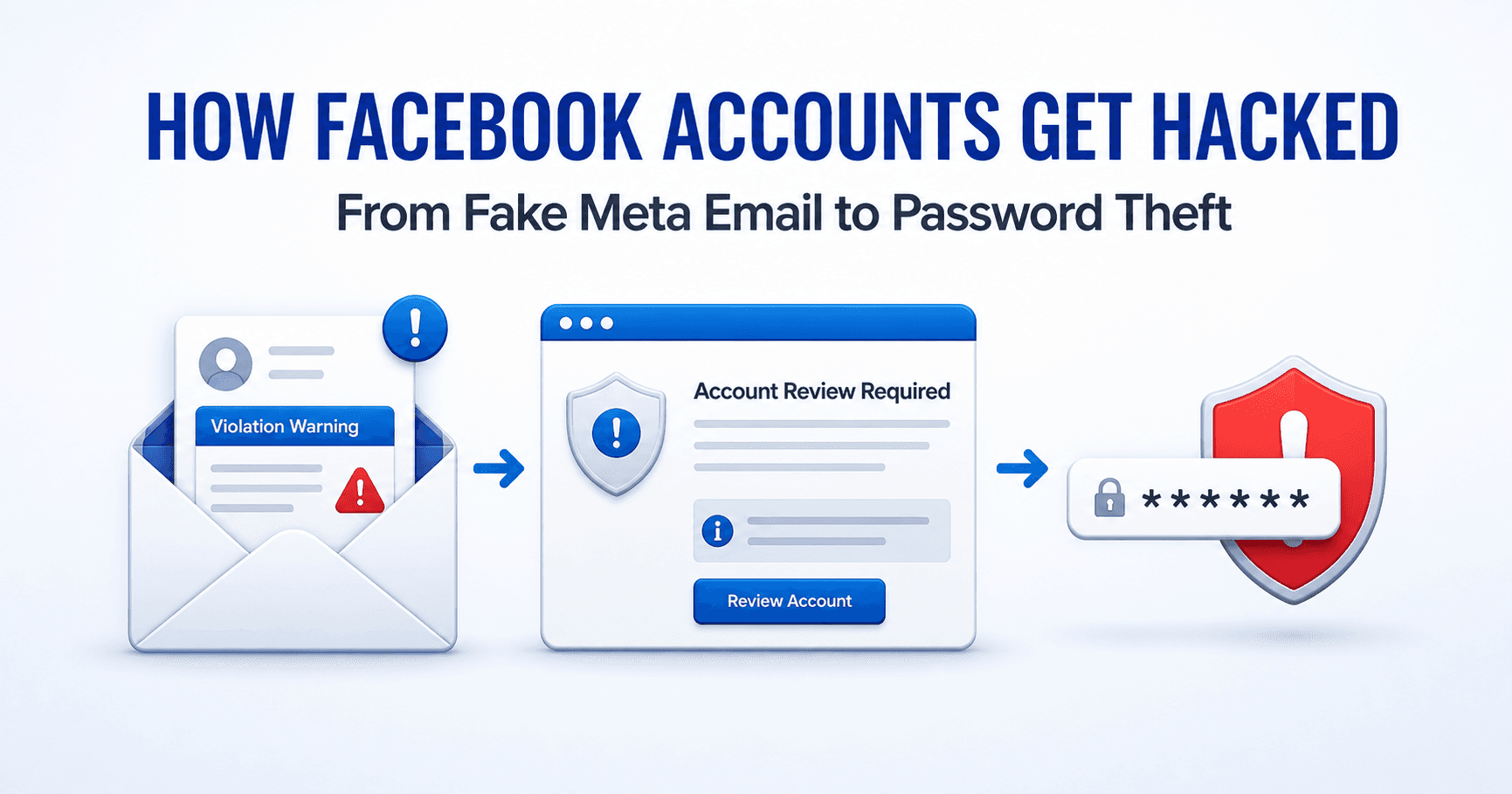
Table of contents
AdShow recently received two convincing emails after promoting its business through Facebook Ads. One claimed that business verification was required to keep advertising. The other alleged a DMCA copyright violation. Both used AdShow’s business identity, created urgency and directed the recipient to a Meta-looking review page outside Meta’s domains. The funnel eventually asked for a Facebook password.
This case shows how Facebook account phishing works in practice: identify a business with valuable advertising assets, find a public contact route, manufacture a credible policy emergency, imitate Meta’s interface and collect information in stages.
The short answer: Facebook accounts commonly get hacked through stolen credentials, compromised email accounts, reused passwords, malware, malicious browser extensions and deceptive partner requests. In the incident documented here, the method was a fake Meta violation email leading to a cloned appeal page and password field.
What happened to AdShow
AdShow operates a self-service platform through which media buyers can review and manage agency advertising account options for Facebook, Google Ads, TikTok and other major advertising platforms. Because the business advertises publicly and provides a support contact, it also presents recognizable signals to anyone hunting for active advertisers.
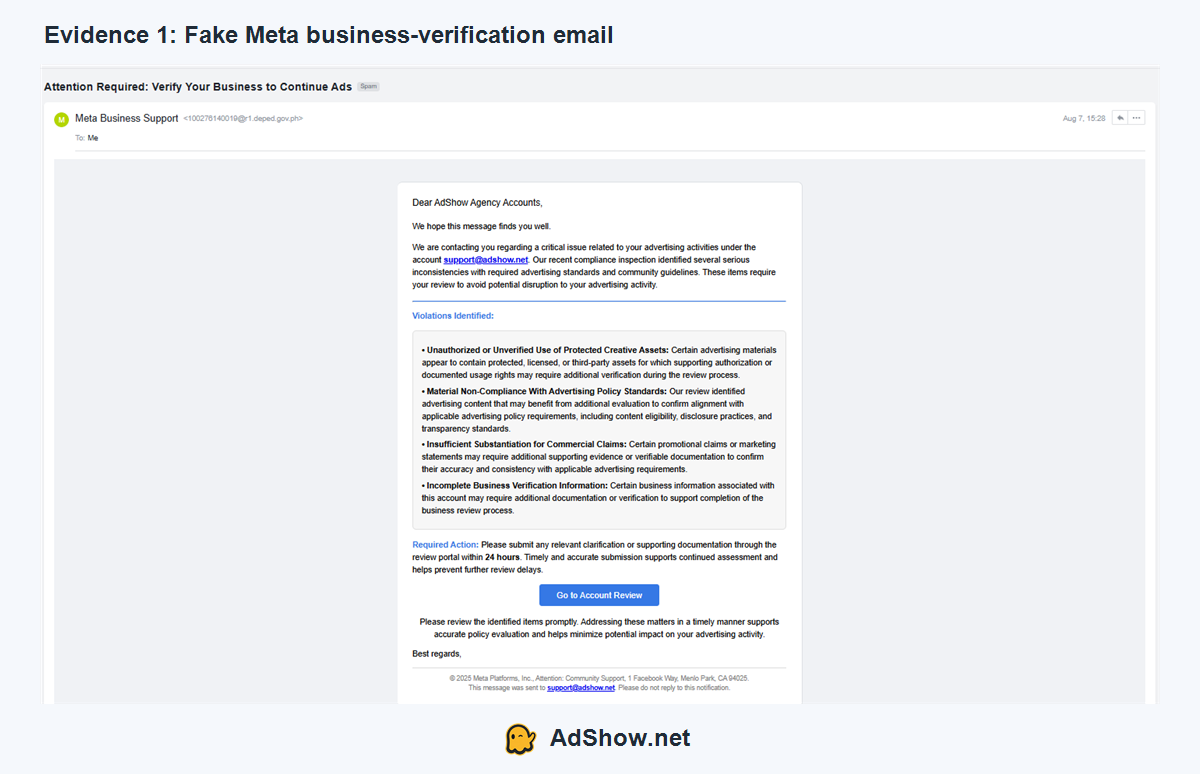
On August 7, AdShow’s support inbox received an email titled “Attention Required: Verify Your Business to Continue Ads.” The sender name appeared as “Meta Business Support,” but the underlying sender address was unrelated to Meta. The message addressed AdShow by name, alleged several advertising-policy problems and imposed a 24-hour response window.
A second email used a different fear trigger: “Notice of DMCA Infringement.” It claimed that copyrighted images had appeared in AdShow’s campaigns and suggested advertising access could be limited unless an appeal was submitted.
The second lure moved away from business verification and used the threat of copyright enforcement instead:
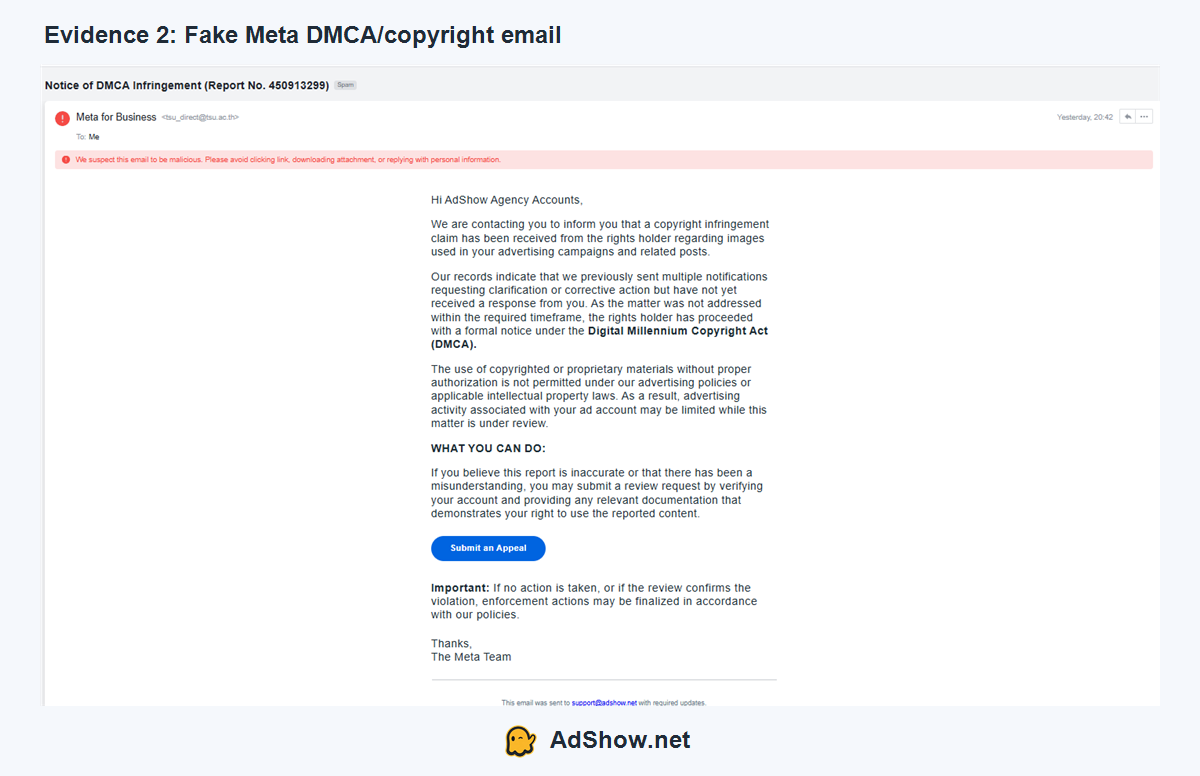
The two messages looked different, but their job was identical: make an advertiser fear the immediate loss of campaigns, Page access or revenue before carefully inspecting the sender and destination.
We cannot prove from the emails alone exactly how the attackers first found AdShow. Our working hypothesis is that publicly visible business or advertising activity was used as a targeting signal, followed by collection of the support email from a public business surface. This matches a recurring complaint from business owners: phishing messages often begin after a Page becomes active, starts advertising or exposes a contact address. Community reports describe fake violation, deletion and copyright messages sent to Page inboxes and public support addresses.
The important lesson is not that Facebook Ads publishes a secret advertiser list. It does not. The lesson is that an active ad, a business Page and a public support email can collectively tell an attacker that a target has assets worth stealing.
The attack worked like a conversion funnel
Media buyers will recognize the structure. Each step removes friction and increases commitment before the final request.
1. Find a business with something to lose
An advertiser may control a Facebook Page, Business Portfolio, ad accounts, Pixels, catalogs, audiences and payment methods. Losing an ordinary social profile is painful; losing the administrator profile that controls these assets can interrupt revenue and expose advertising budget.
That makes active businesses attractive phishing targets. The attacker does not need to know the victim’s password at the beginning. A brand name, Page name and contact email are enough to personalize the first message.
2. Select a fear trigger that advertisers already understand
The AdShow messages used four familiar pressure points:
advertising-policy violations;
incomplete business verification;
copyright or DMCA infringement;
imminent restriction unless action was taken within 24 hours.
These threats work because genuine Meta enforcement exists. Advertisers know that ads can be rejected and accounts can be restricted, so a fake notice does not need to invent an unfamiliar event. It only needs to imitate a real anxiety.
3. Move the victim away from the inbox
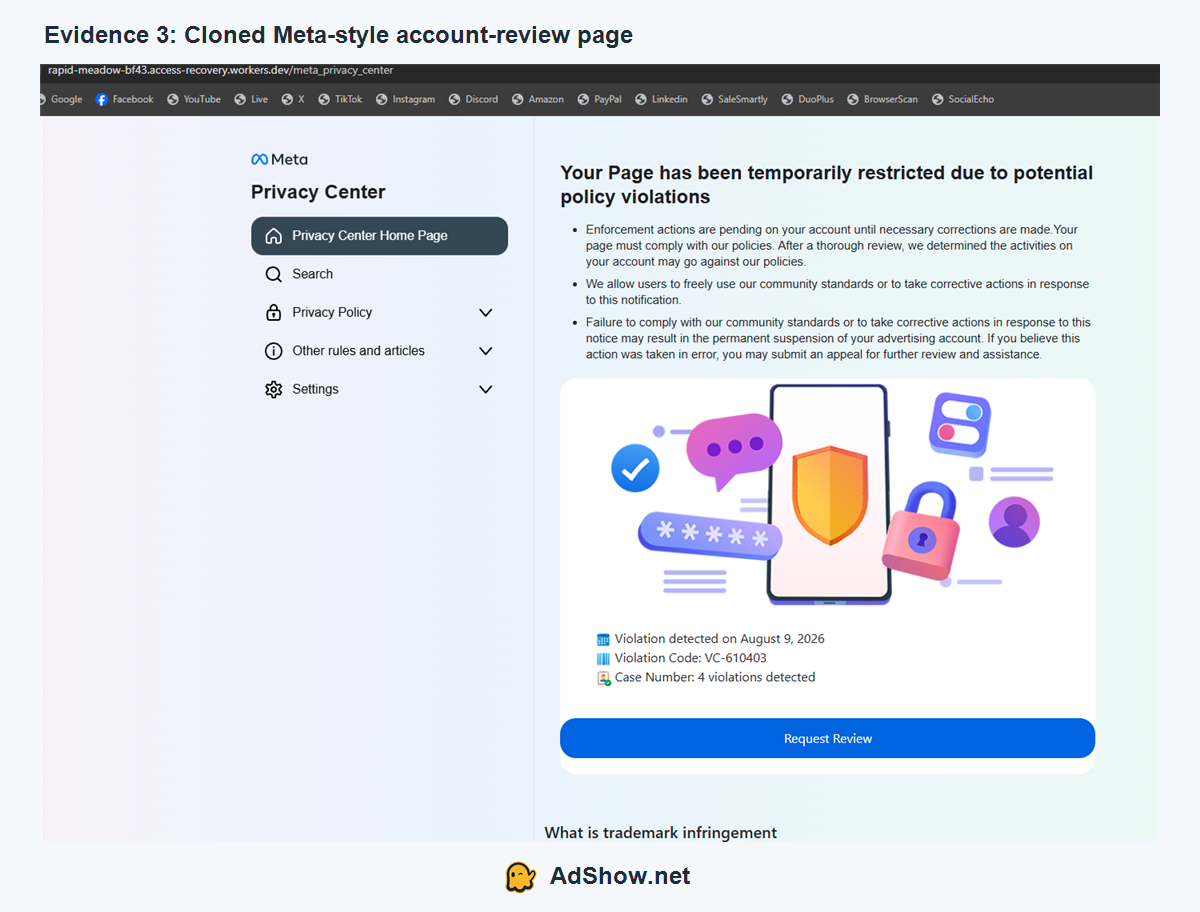
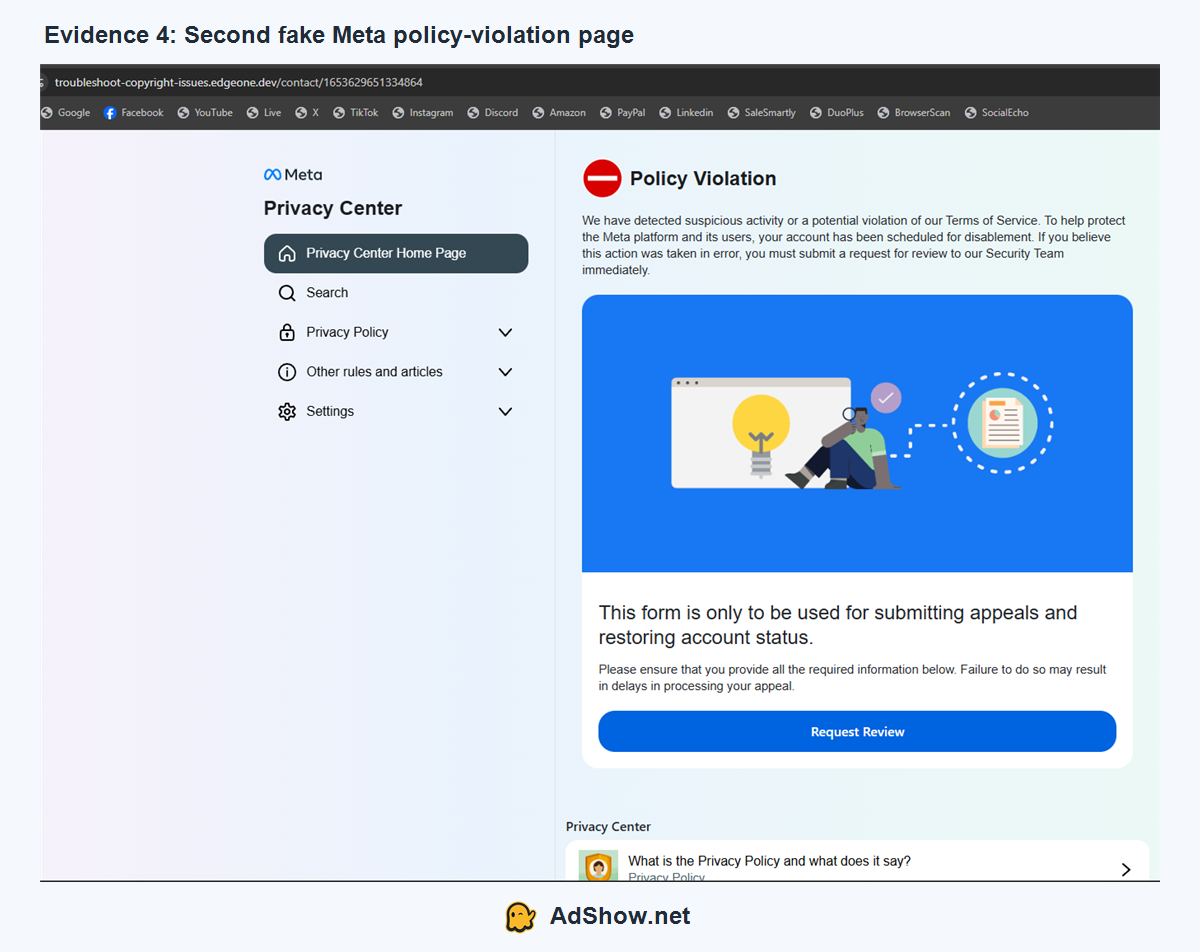
Both messages presented a prominent review or appeal button. The destination was not facebook.com, meta.com or another clearly recognized Meta property. One page was hosted beneath a workers.dev address; another used an unrelated .dev domain.
The pages copied familiar colors, navigation labels, Meta-style branding and phrases such as “Privacy Center,” “Policy Violation” and “Request Review.” Visual familiarity was being used in place of authentic domain ownership.
The first destination imitated a Meta Privacy Center and displayed a prominent “Request Review” action:
A second domain used a different layout and “Policy Violation” warning, but followed the same external-review pattern:
4. Collect believable information before asking for the password
The fake appeal did not immediately open with an obvious username-and-password form. It first requested business email, phone number, Page name, personal phone, date of birth and an explanation of the supposed violation.
This progressive sequence serves two purposes. It makes the process resemble a compliance review, and it gathers additional identity data even if the victim stops before the final step. After the user has completed several fields, a password request can feel like confirmation rather than credential theft.
5. Capture the administrator’s Facebook password
The final page displayed a Facebook-style password box. At this point, anyone who entered a real password would be sending it to infrastructure outside Meta.
If that password belongs to a person with broad Business Manager permissions, the attacker may then attempt to log in, change recovery details, add another user or partner, remove legitimate administrators, access Pages, alter campaigns or spend through available payment methods. Two-factor authentication can stop some attempts, but sophisticated phishing flows may also request a one-time code or session token.
Meta’s own Help Center warns that malicious actors send Business Manager partner requests containing phishing links and that entering a username or password into a malicious page may allow another person to access the account. Meta recommends reporting suspicious messages and securing the account immediately.
Seven signs that the Meta email was fake
1. The display name and sender domain did not match
“Meta Business Support” was merely a display name. The actual sender addresses belonged to unrelated domains. A recognizable name beside an avatar does not authenticate the sender.
2. The appeal link left Meta’s ecosystem
The review pages were hosted on unrelated .dev infrastructure. A padlock icon or HTTPS connection only means the connection to that domain is encrypted; it does not mean Meta owns the domain.
3. The email used a short deadline to suppress verification
The 24-hour warning was designed to make the recipient act inside the email rather than independently check Meta Business Support Home, Account Quality or the Support Inbox.
4. The accusations were broad but looked legally serious
The messages mentioned protected creative assets, policy compliance, commercial claims, business verification and DMCA. Yet they did not provide a clear affected ad, creative, Page post, account ID or verifiable case record.
5. The fake page relied heavily on copied visual identity
Meta-style colors, logos and navigation can be reproduced. The browser address bar is stronger evidence than the logo in the page body.
6. The form requested data unrelated to the alleged violation
A birthday and personal telephone number do not prove the right to use an advertising creative. Unexpected identity fields should trigger a pause, especially when the process began from an unsolicited email.
7. A non-Meta website requested the Facebook password
This was the decisive sign. Never enter a Facebook password into a page merely because it visually resembles Facebook. Open a separate clean tab and navigate to Facebook or Meta directly.
How to verify a real Meta warning safely
Do not use the button in the message to determine whether the message is legitimate. That allows the sender to control both the accusation and the evidence.
Instead:
Open a new browser tab or the official app.
Navigate to Facebook or Meta Business Suite directly—not through the email.
Check Business Support Home, Account Quality and the account’s Support Inbox.
Identify the exact Page, profile, Business Portfolio, ad account, campaign or creative allegedly affected.
Confirm whether the case appears inside the authenticated business environment.
Ask a second authorized administrator to check independently when the notice threatens immediate asset loss.
Forward a suspicious message to
[email protected]and report it to the email provider, as recommended by Meta.
Meta advises businesses to verify account problems through Business Support Home. Its Help Center also notes that genuine intellectual-property removals include information about the affected content and reporting party. That is materially different from a generic external form whose real purpose is collecting credentials.
Why advertiser access deserves stricter protection
The highest-risk credential is often not a generic company login. It is the personal Facebook profile belonging to the person with full control over the business.
One compromised administrator may expose several downstream assets. This is why a media-buying team should separate public communications from privileged access:
Do not use the public support inbox as the primary login for privileged administrators.
Give each person their own access instead of sharing one Facebook login.
Apply the minimum role needed for the person’s job.
Maintain at least two trusted administrators so one compromised or disabled profile does not become a single point of failure.
Require two-factor authentication and protect the connected email account just as carefully.
Review users, partners and permissions on a schedule—not only after an incident.
Establish an internal rule that policy emails are verified inside Meta before anyone opens an appeal link.
Our detailed guide to Facebook Business Manager access and administrator security explains how to reduce hack, lockout and asset-control risks before an emergency occurs.
For teams handling multiple advertisers, access security should sit alongside transparent account operations. AdShow provides a self-service dashboard for reviewing available Facebook agency ad account options, as well as Google Ads, TikTok and other major advertising platforms. An agency account does not eliminate platform enforcement or phishing risk; the operational benefit is clearer account requests, funding visibility and incident reporting without running the lifecycle entirely through chat.
What if you already entered information?
The correct response depends on where you stopped.
Opened the email only: report it, block the sender and warn the team.
Opened the external page: close it and do not download anything; review the device if the page prompted a file or extension.
Entered contact details: expect more targeted calls, emails or recovery scams.
Entered a Facebook password: treat the credential as compromised immediately.
Entered a two-factor code or approved a login: assume an active takeover attempt and inspect sessions, recovery methods and business permissions.
We cover the containment and recovery sequence in the companion guide: Facebook Account Hacked? What to Do Before You Lose Your Page, Business Manager and Ad Accounts.
That link is intentionally included before the second article is published. Once the companion post is live at the specified slug, the two pages will form one cluster: this investigation explains how the attack works; the recovery guide explains what to do next.
Frequently asked questions collected from advertiser communities
The questions below reflect recurring discussions among Page owners, small businesses and media buyers across Reddit, Facebook advertising communities and support forums. Community reports are useful for identifying patterns, but account-specific action should still be verified through Meta’s official interfaces.
Why did phishing emails appear after I started Facebook Ads?
Public advertising activity makes a business easier to discover and signals that the Page may control valuable assets. Attackers may then find a public email on the Page or website. This does not prove that Meta disclosed the email or that every message is connected to an ad impression.
Can a Facebook account be hacked just by opening an email?
Usually, reading the email alone does not surrender the Facebook password. Risk increases after opening an external link, entering credentials, approving a login, installing an extension or downloading malware. If a device downloaded or executed something, treat it as a separate malware incident.
Can a phishing email really come from a legitimate Meta domain?
Sometimes attackers abuse legitimate platform features so that a notification passes through real infrastructure. Meta itself warns that Business Manager partner requests can contain phishing links. Therefore, checking the sender domain is necessary but not always sufficient; inspect the action being requested and verify it independently inside the authenticated business environment.
Does Meta ask for my password during a policy appeal?
You may need to authenticate when accessing an official Meta product, but a third-party domain should never collect your Facebook password. Navigate to Meta independently instead of trusting a login page reached from an unsolicited notice.
Are copyright and DMCA notices always phishing?
No. Genuine intellectual-property enforcement exists. The safe approach is to verify the affected content and case inside official Meta surfaces, rather than assuming every notice is fake or trusting every email that uses legal terminology.
Will two-factor authentication prevent every Facebook takeover?
No. It is an essential control, but attackers may try to steal one-time codes, obtain session cookies, compromise the connected email or persuade another administrator to grant access. Strong permissions and team procedures must support 2FA.
The operational lesson
The AdShow incident did not begin with an advanced exploit. It began with information that helped the attacker construct a believable story: a real business, an active advertising context, a public contact route and a fear that campaigns could stop.
That is why the most effective defense is not simply “look for spelling mistakes.” Modern phishing pages can be visually polished and personalized. The durable rule is to separate the message from the verification process: receive the warning in one channel, then independently inspect the relevant asset inside the official platform.
If an email controls the accusation, the deadline, the review page and the password form, it is not a support process. It is a funnel—and your administrator credential is the conversion.
Sources
Meta: Suspicious emails or messages claiming to be from Facebook
Meta: Protect personal and business accounts from credential-stealing malware
Meta: Next steps after intellectual-property content removal
Advertiser discussion: phishing messages after running Facebook ads
Advertiser discussion: fake Meta violations sent to a business contact address