Facebook Business Manager Access: Protect Admins and Ad Assets
Learn how to structure Facebook Business Manager access to reduce hack, admin lockout and asset-control risks across ad accounts, Pages and pixels.

August 8, 2026
Table of contents
Facebook Business Manager access is often treated as an onboarding task: invite a person, assign an ad account and move on. That is a dangerous way to think about it.
Access is part of your advertising infrastructure. If the only person with full control is hacked, disabled or removed, a business can lose operational control of its Facebook Page, ad accounts, pixel, audiences, catalog and billing workflow at the same time. The campaigns may still exist, but the people responsible for them may no longer be able to manage them.
The practical goal is not to make a Business Portfolio “impossible to hack” or “immune to suspension.” No access design can promise that. The goal is to remove avoidable single points of failure, limit what a compromised user can reach and preserve a credible recovery path.
The short answer
A safer Facebook Business Manager access structure has five characteristics:
Every person uses an authentic, individually secured Facebook profile.
Full control is limited to a small number of trusted administrators, with carefully protected continuity if one administrator becomes unavailable.
Employees, contractors and agencies receive only the business and asset permissions required for their work.
The business knows who owns each Page, ad account, pixel, catalog and payment relationship.
Account IDs, access records, business documents and an incident-response checklist are stored before anything goes wrong.
Two-factor authentication matters, but it is only one layer. A business can still be locked out because the sole administrator loses their personal profile, an old agency retains ownership, an employee has excessive permissions or a phishing request is approved from a legitimate-looking Meta notification.
Why Facebook Business Manager access is a security problem
When a media buyer tells me, “The client already gave us access,” my next question is: access to what, at which level and through which business?
Being added to a Business Portfolio does not automatically mean a person can see every asset inside it. Page access, ad-account permissions, pixel access, catalog access and financial permissions can be assigned separately. Partner access and individual user access are also different relationships.
That complexity creates several failure paths:
A user can see the business but not the ad account.
An agency can see the Page but not the pixel needed for optimization.
A media buyer can edit campaigns but cannot investigate billing.
A partner business may have access, while the actual operator inside that partner business has not been assigned to the asset.
A former employee or agency may still have more control than the current team.
The only full-control administrator may be tied to a personal profile that later becomes hacked or disabled.
Security is therefore not just a password problem. It is an ownership, permission and continuity problem.
What advertisers are reporting in the real world
Community reports should not be treated as Meta policy, but they are useful for identifying where real operators get hurt.
In one 2026 discussion, an advertiser said a compromised Business Manager affected multiple businesses and ad accounts, leaving the original administrators without access. The questions were not simply “How do I reset a password?” They were whether ownership, campaign history and account control could be recovered at all. Read the discussion on Reddit.
Another advertiser described losing the personal Facebook profile that was the only administrator of the Business Manager. The result was loss of access to the connected dataset or pixel even though the advertiser still controlled the Shopify store. Read the sole-admin lockout discussion.
A third case involved an attacker removing legitimate administrators from a Business Portfolio while the business still retained some Page access. That distinction matters: controlling a Page in one surface does not necessarily restore full control of the Business Portfolio that owns or manages its advertising assets. Read the Business Portfolio takeover discussion.
These accounts differ in their details, and forum commenters sometimes recommend unsafe or unsupported shortcuts. But the recurring pattern is clear: the cost of an access incident is much higher when one identity controls everything and the business has no documented asset map.
The Facebook Business Manager access safety architecture
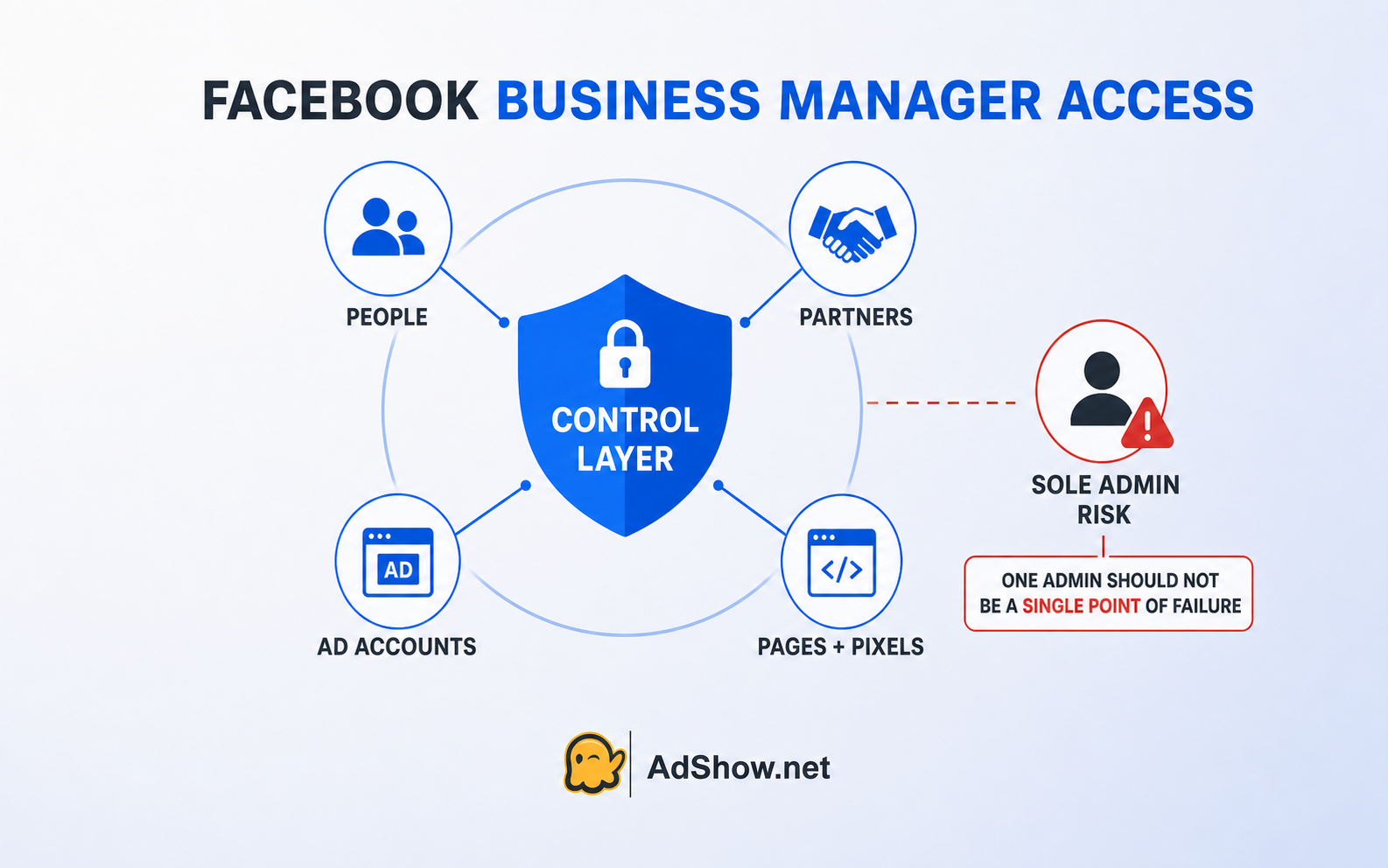
The best way to protect advertising assets is to think in layers rather than treating “admin access” as a single switch.
1. Secure the identities that can reach the business
Each person managing a Page or business asset should use an authentic profile and should not share a password. Meta states that Page managers must use profiles based on their authentic identities and that people should not share passwords or transfer accounts to others. See Meta’s identity guidance.
For every person with meaningful access:
Enable two-factor authentication.
Secure the email account used for recovery.
Review active sessions and remove devices that are not recognized.
Use a password that is not reused on other services.
Treat unexpected copyright, policy and partner-request messages as potential phishing.
Never install an unknown browser extension or remote-access tool because a “Meta representative” requests it.
Meta has specifically warned that malicious actors may send Business Manager partner requests containing phishing links, including notifications that appear to come from a legitimate Meta email domain. An unfamiliar business request should be verified inside the platform rather than trusted because the email looks authentic. See Meta’s phishing guidance.
2. Remove the sole-admin failure point
A single administrator feels simple until that profile is compromised, disabled or inaccessible.
The operational answer is not to make everyone an administrator. Every additional full-control user increases the attack surface. A better design is a small, deliberate control group:
Keep full control with the minimum number of trusted people needed for continuity.
Protect those identities more strictly than ordinary campaign users.
Make sure the business is not dependent on a former employee, external freelancer or one founder’s personal device.
Document who can add or remove people, partners and assets.
Test whether the backup control path actually works before an emergency.
This is an operator recommendation, not a guarantee against enforcement. If Meta restricts a Business Account or connected asset, having another administrator does not override that decision. It only reduces the risk that one unavailable identity creates an avoidable operational lockout.
3. Use least privilege at both business and asset level
Most team members do not need full control.
Give people the lowest level of access that still lets them do their jobs:
Analysts need reporting access, not billing control.
Buyers may need campaign-editing access without the ability to add administrators.
Finance staff may need billing visibility without campaign permissions.
Contractors should receive access only to the assets and period covered by their work.
People who no longer work with the business should be removed promptly.
Then audit the individual assets. Do not assume that assigning a person to the business also assigned the correct Page, ad account, pixel or catalog.
4. Prefer structured partner access over shared logins
When an agency or external team needs access, use an appropriate partner relationship and assign the necessary assets. Do not send the client’s personal login credentials through chat.
Partner access creates a cleaner separation between organizations, but it still needs verification:
Confirm the partner Business ID through a trusted channel.
Share only the required assets.
Check which permissions were granted for each asset.
Make sure the partner assigns the right internal people after access is approved.
Remove the relationship when the engagement ends.
One common onboarding failure is that the client shares a Page but forgets the ad account or pixel. Another is that the partner business appears correctly, but the media buyer working inside that business cannot see the asset. A good handover checklist verifies the result from both sides.
5. Build an asset ownership map
Create a simple register before you need one. For each advertising asset, record:
Business Portfolio name and ID.
Facebook Page and Instagram account.
Ad account name, ID and currency.
Pixel or dataset ID.
Catalog and connected commerce assets.
Current full-control administrators.
Partner businesses and their purpose.
Who can manage finance and payment methods.
Which legal entity and domain the assets support.
The most important column is not “who can see it?” but “which business owns or controls it?” Access can be removed. Ownership and release processes are harder to unwind, especially when an old agency or inaccessible Business Portfolio is involved.
6. Contain billing damage
Access incidents can become financial incidents. A malicious administrator may launch campaigns, change payment settings or use connected assets in ways the legitimate team cannot immediately stop.
Prepare containment steps in advance:
Know who receives payment and campaign notifications.
Review unfamiliar spend, campaigns and administrators regularly.
Keep the bank or payment provider’s emergency contact route available.
Document normal billing thresholds and payment methods so unusual changes are easier to identify.
If unauthorized financial activity occurs, secure the Meta account and contact the relevant financial institution promptly.
Meta’s phishing guidance advises users who suspect unauthorized financial access or payments to contact their bank. This should be part of the incident plan, not improvised after fraudulent spend appears.
7. Prepare the recovery evidence file
Recovery is easier to explain when the business can identify itself and its assets clearly.
Maintain a restricted, secure record containing:
Business registration information.
Authorized representative details.
Business Portfolio, Page, ad-account and pixel IDs.
Screenshots or exports showing legitimate access before the incident.
Recent invoices and payment records.
A timeline of suspicious changes and notification emails.
Support case numbers and the exact scope of each report.
Do not store passwords, two-factor codes or recovery codes in the same general-access document.
A 15-minute Facebook Business Manager access audit
Use this sequence today, before an incident:
List every person with business access.
Identify everyone with full control.
Remove unknown, duplicated and departed users.
Confirm two-factor authentication and recovery-email security for privileged users.
List every partner business and why it still needs access.
Check Page, ad-account, pixel, catalog and finance permissions separately.
Confirm the business is not dependent on one administrator.
Record asset IDs and ownership in the recovery file.
Review recent sessions, business changes and unexpected campaigns.
Confirm who will respond if access or billing changes overnight.
This audit does not guarantee that an account will never be hacked or restricted. It gives the team a much better chance of detecting a problem, limiting its scope and explaining what changed.
What to do if access has already been lost
The correct path depends on the scope. Do not treat every problem as “Business Manager suspended.”
If a personal Facebook profile was hacked
Use Facebook’s official hacked-account flow, preferably from a device previously used to sign in. Secure the associated email account, reset the password, review active sessions and check recent Facebook emails. Meta directs hacked users to facebook.com/hacked.
If a Page was taken over or an administrator was removed
Meta provides a Page-recovery process for cases in which a hacker or scammer added themselves and removed legitimate access, including incidents involving Business Manager or Meta Business Suite. Meta recommends submitting its official recovery form and reviewing the Page and Business Portfolio for unrecognized changes after access returns. See Meta’s hacked Page recovery instructions.
If the user, Page, ad account or Business Account was restricted
First identify the exact restricted object. A user restriction, Page restriction, ad-account suspension and Business Account restriction are not interchangeable.
Meta says restrictions may be applied for severe or repeated policy violations, attempts to evade enforcement, inauthentic accounts or connections to abusive assets. If a restriction appears incorrect, the review route is Business Support Home. See Meta’s advertising restriction guidance.
Do not create fake profiles, cycle through new accounts or use another account to bypass an active enforcement decision. Those actions can create additional policy risk and make the ownership record harder to explain.
If an old Business Portfolio or agency still controls an asset
Determine whether the business needs access, partner sharing or an ownership-release process. Meta provides a Page ownership-release request in qualifying cases, but the workflow, waiting period and eligibility differ from ordinary partner access. See Meta’s Page ownership release guidance.
Questions media buyers repeatedly ask about Facebook Business Manager access
The questions below reflect recurring access and security concerns raised in media-buying communities, public forums and Reddit discussions. The answers are based on the access-control principles explained in this guide and checked against relevant Meta guidance; individual incidents can still differ according to asset ownership, permissions and enforcement status.
Can a hacked Facebook administrator remove other administrators?
It is possible for a compromised administrator with sufficient control to make damaging access changes. Meta’s recovery guidance explicitly describes attackers adding themselves to a Page and removing legitimate access. The exact impact depends on the compromised user’s permissions and the assets involved.
Is two-factor authentication enough to protect Facebook Business Manager?
No. It is an essential identity-security layer, but it does not fix excessive permissions, a sole-admin dependency, old partner access, compromised recovery email or unclear asset ownership.
Should every team member have full control as a backup?
No. That increases the number of identities capable of making high-impact changes. Use a small, trusted control group and give other users only the permissions required for their roles.
Will a backup administrator prevent a Business Account restriction?
No. A backup administrator can improve operational continuity when one person loses access. It cannot override Meta’s enforcement against a user, Page, ad account or Business Account.
Final takeaway
Facebook Business Manager access should be designed for the day when something goes wrong—not only for the day a new buyer joins the team.
Protect the identities. Minimize full-control access. Remove the sole-admin dependency. Map ownership. Separate partner access from personal logins. Prepare recovery evidence before an emergency.
That will not make a business impossible to hack or immune to Meta enforcement. It will make the advertising operation harder to hijack, easier to audit and more resilient when one user, one agency relationship or one account status changes.
When your team is ready to evaluate self-service advertising-account infrastructure, review the available Facebook agency ad account options on AdShow or create an AdShow account.