Google Video Ad Under Review: When to Wait, Check or Escalate
Google video ad under review? Use a two-clock diagnosis to separate policy review from post-approval delivery, avoid unnecessary edits and know when to escalate.

September 3, 2026

Table of contents
A Google video ad under review means Google is still checking the ad, its associated creative and its destination. It does not, by itself, mean the ad is disapproved. Google states that most ads are reviewed within one business day, although more complex reviews can take longer. Check the status after two full business days, and contact Google Ads support if it remains under review for more than a week. There is no guaranteed approval timeline. The practical fix is to identify which of two clocks is running before changing anything.
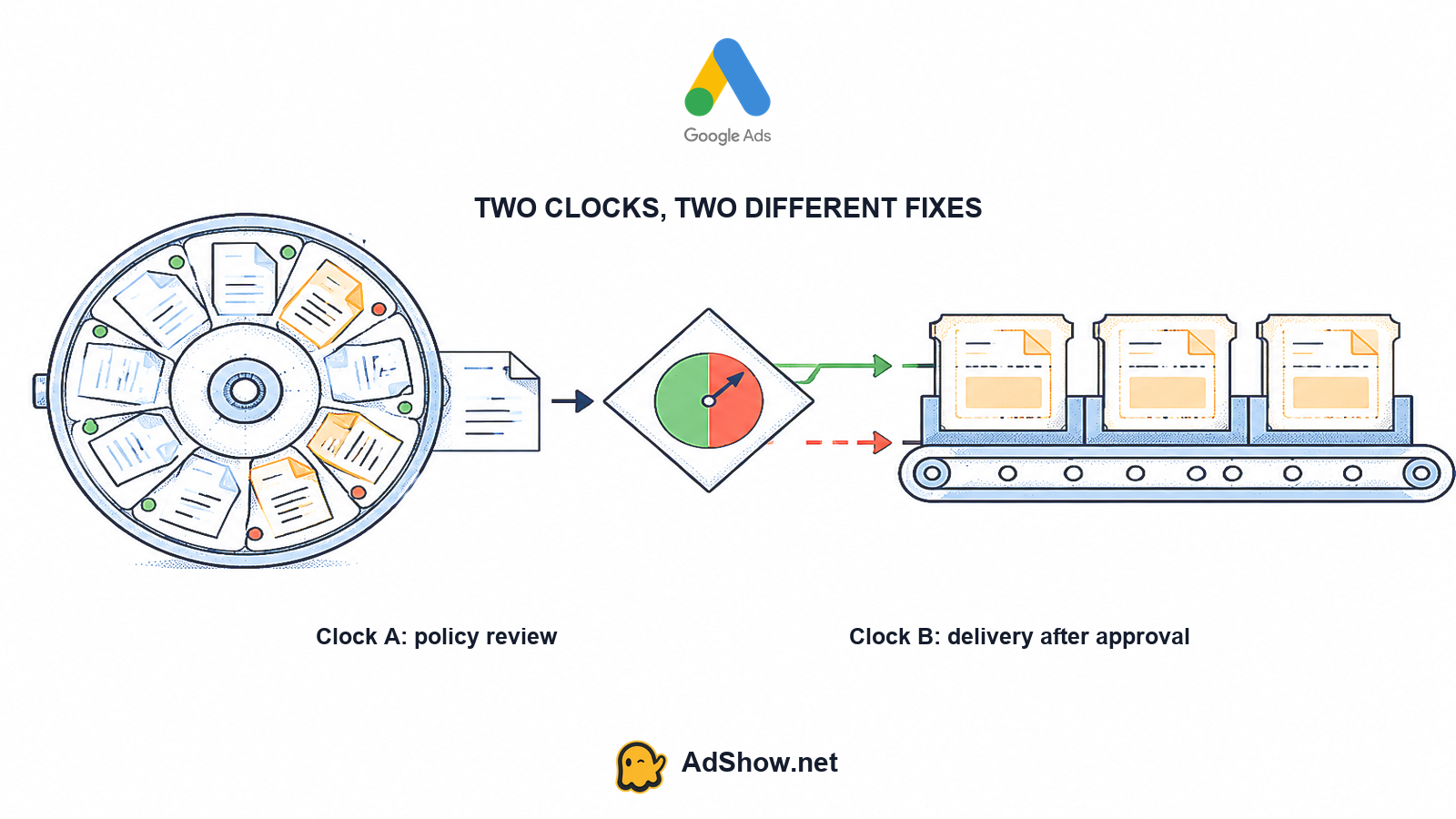
The two-clock diagnosis
Clock A is the policy-review clock. It starts when you submit a new ad or make an edit that requires another review. It ends when the ad receives a status such as Eligible, Eligible (limited) or Disapproved. During this clock, the main question is whether Google has finished evaluating the ad and its related elements. Google’s official review documentation describes the review process, typical timing and escalation path here: Google Ads ad review process.
Clock B is the delivery clock. It starts only after the ad is eligible to serve. At that point, an ad can be approved yet receive little or no traffic because the campaign or ad group is paused, billing is blocked, verification is incomplete, the YouTube channel is not linked correctly, the bid or budget is uncompetitive, targeting is narrow, the campaign is learning, or available inventory is limited. Google’s video troubleshooting guidance separates these delivery conditions from review status: Google Ads video campaigns not running or low traffic.
Harris Eugene’s operator note: Harris Eugene operator note: decide which clock is running before touching creative. If the ad is still under review, changing bids or duplicating campaigns does not finish policy review; editing the creative may restart it. If the ad is eligible, stop treating the issue as a policy queue and inspect delivery controls instead.
What Google is checking on a video ad
Google’s formal review scope covers the ad and its associated components, including the destination and applicable policy context. For a video campaign, your evidence checklist should include the video content itself, spoken or written claims, audio, thumbnail, end screens, companion creative, headline, description and landing page. Restricted-category context can also matter because the same creative may be treated differently depending on the product, audience or destination.
The first sentence above reflects Google’s documentation. The more detailed video inventory is an editorial troubleshooting checklist, not a claim that Google publishes one single public queue for every listed component. Community discussions sometimes attribute a delay to a particular asset without account access, so treat those explanations as anecdotal rather than diagnostic proof.
Editing the ad or its assets can trigger a new review. That includes changes intended to fix an unrelated delivery problem. Repeated speculative edits can therefore keep resetting Clock A. Before changing a title, thumbnail, video URL or destination, record the current status and the last edit time. Google’s status guidance explains how to inspect statuses and why edits can initiate another review: Google Ads ad and asset status.
A practical timeline: wait, check, then escalate
At 0–1 business day: confirm the ad, ad group and campaign are enabled; note the exact status and timestamp; verify that the video URL, destination and YouTube channel are correct; then wait unless there is an obvious setup error. Most ads are reviewed within one business day, but this is not a guarantee.
After two full business days: inspect Policy Manager and the ad’s status details without editing the creative. Check for a policy explanation, pending verification, billing alerts, destination problems or a channel-linking issue. If the status is still Under review, preserve screenshots and the relevant times before contacting support.
After one week: escalate through Google Ads support if the same ad remains under review. Include the account, campaign, ad group, ad identifier, exact status, last edit time, video URL and screenshots. Do not assume that a support case guarantees a faster review or approval.
This sequence follows Google’s published timing guidance: most ads are reviewed within one business day, complex reviews may take longer, advertisers should check after two full business days and should contact support when the status lasts more than a week. The purpose of the timeline is to prevent both premature edits and indefinite waiting.
Read the status before diagnosing delivery
Under review: Clock A is still open. Google has not completed the current review, so zero impressions do not yet prove a bidding, budget or targeting problem.
Eligible: Clock A has ended positively. Move to delivery checks: campaign and ad-group enablement, billing, verification, channel linking, bids, budget, targeting, learning and inventory.
Eligible (limited): The ad may serve, but restrictions can reduce reach. Read the policy details and confirm that the remaining audience and placements fit the campaign objective.
Disapproved: Clock A ended with a policy problem or another blocking issue. Read the cited reason and make a compliant correction or appeal where Google provides that option.
Pending verification or account suspension: This is an account-level condition, not simply a video-ad review. Resolve the account requirement first. If verification is the problem, see Google Ads advertiser verification failed.
A May 11, 2026 Google Ads Community thread illustrates the confusion: a user described a video as pending, while community guidance focused on separating the ad’s review state from broader campaign conditions. The thread is useful as an example of the diagnostic problem, not as official evidence about the account or a guaranteed cause: Recent Google Ads Community video-pending discussion.
If the video is eligible but still has no views
Once the video is Eligible, stop waiting for Clock A. Check Clock B in layers. First confirm that the campaign, ad group and ad are enabled and that the selected campaign type can use the format. Then check payment status, account billing notices and any advertiser verification banner. Confirm that the YouTube channel is linked to the Google Ads account and that the selected video remains available.
Next inspect the bid strategy, budget, targeting, audience size, exclusions, geographic settings, frequency controls and available inventory. A narrow combination can produce little delivery even when every policy status is positive. Learning or campaign-level constraints can also delay meaningful volume. For a broader diagnostic, use Google Ads zero impressions: check these 5 layers.
An April 2, 2026 Reddit discussion is an unverified example of why exact statuses matter: an advertiser reported a Video Views campaign with no delivery, and commenters first asked for the precise campaign, ad-group and ad status. It should not be treated as a confirmed Google explanation or benchmark: Reddit PPC delivery discussion.
Preserve evidence before you edit or escalate
Timestamp and timezone when the review or delivery problem was observed.
Campaign, ad-group and ad status, including whether each is enabled.
Policy details and any visible limitation or disapproval reason.
Most recent edit time and a description of what changed.
Video URL, thumbnail or asset identifiers and linked YouTube channel.
Billing banner, payment warning or advertiser-verification banner.
Support case ID, if Google Ads support has already been contacted.
This evidence prevents a common failure mode: an advertiser changes the video, then reports the old review duration even though a new review has begun. If support asks for more information, provide the captured state rather than making several unrelated edits while waiting.
Where an agency account fits—and where it does not
AdShow’s Google agency account service can change access and operating workflow through self-service account access, visible marketplace offers, dashboard requests, funding or top-ups and issue reporting. It cannot bypass Google’s video review, guarantee approval, remove a policy violation or force delivery. It also does not cure weak creative, learning limits, targeting constraints or lead-quality problems.
If your ad is already eligible and you need a managed account route, you can inspect the current Google agency account service. Choose that path for account-operation needs, not as a shortcut around Clock A.
Sources and scope limitations
This article is based primarily on Google’s official documentation for ad review, ad and asset statuses, and video-campaign delivery troubleshooting. The Google Ads Community and Reddit links are recent anecdotal discussions used only to illustrate diagnostic confusion; participants cannot inspect every account, and their explanations are not policy determinations. Timing can vary by review complexity, account state, creative and policy context. No timeline here is a guarantee, and neither AdShow nor an agency account can bypass Google’s decisions.
Need a managed Google agency account route after confirming your ad is eligible? Review the current AdShow service options. Review Google agency account options
Questions from recent advertiser discussions
How long does a Google video ad review take?
Google says most ads are reviewed within one business day, while more complex reviews can take longer. Check the status after two full business days. If the ad remains under review for more than a week, contact Google Ads support. These are published guidance points, not guaranteed deadlines.
Does editing a video ad restart the review?
Editing an ad or its assets can trigger a new review. A change to the video, thumbnail, headline, description or destination may therefore reset the relevant review clock. Record the current status and last edit time before making a speculative change.
Why does an eligible video still have zero views?
Eligibility ends the policy-review clock but does not guarantee delivery. Check campaign and ad-group enablement, billing, verification, YouTube channel linking, bids, budget, targeting, learning status and inventory. Diagnose these delivery layers instead of repeatedly editing an already eligible creative.
Will an agency account speed up Google video ad approval?
No agency account can bypass Google’s review, guarantee approval or fix a policy violation. An agency account service may change access and operating workflow, but it should be considered only after you identify the actual issue and confirm that the account route fits your operating needs.
Sources and scope
Official documentation defines platform behavior. Recent community discussions are used only to illustrate reported symptoms and questions; they do not prove the cause of an individual account outcome.
Google Ads ad review process — Official review states, review scope and current escalation timing. Most ads are reviewed within one business day, while complex reviews can take longer.
Google Ads Video campaigns not running or low traffic — Official video-specific troubleshooting separates review status from channel linkage, bidding, targeting, learning and delivery conditions.
Google Ads ad and asset status — Official instructions for checking Under review and related statuses; editing ads or assets can trigger a new review.
Recent Google Ads Community video-pending discussion — May 11 2026 user report and community guidance illustrate confusion between a pending video review and other campaign-level blockers. Community answers cannot inspect the account.
Recent PPC video-delivery discussion — April 2 2026 discussion shows why exact ad, ad-group and campaign status must be collected before diagnosing zero delivery. Reports are anecdotal and unverified.