Google Search Partners: Keep Them On or Turn Them Off?
Google Search Partners are not automatically bad. Compare qualified CPA, conversion delay and measurement quality before deciding whether to keep the network enabled.

August 31, 2026
Table of contents
Google Search Partners should stay on only when the partner segment produces acceptable qualified economics and your CRM can distinguish its outcomes. Turn them off in a standard Search campaign when qualified CPA exceeds your loss cap, lead quality is materially weaker, or reporting cannot map partner conversions to downstream results. Do not assume every partner click is fraudulent. Treat the network as a channel allocation experiment: segment it, measure qualified outcomes, account for conversion delay, and make a conditional decision.
What Google Search Partners Are
Google Search Partners are search sites and properties that participate in Google's Search Network and can show ads triggered by relevant searches. They are different from Google Search itself, which refers to ads shown on Google search results pages. They are also different from the Display Network, where ads appear across websites, apps and other placements based on display targeting rather than a standard search-results experience. Google's current documentation says Search partners are included by default for Search campaigns, while the campaign Networks setting provides a way to opt out. The same documentation notes that partner click-through rate does not affect Google Quality Score. See the official Google Ads Search Network documentation.
Do not confuse Search Partners with the Google Partners agency badge. The badge describes an agency's relationship with Google and its requirements; it does not mean that a click came from the Search Partner network. An agency account also does not create premium immunity from weak leads, invalid traffic, policy enforcement or campaign learning limitations.
The Decision Rule Is Qualified Economics
A low reported cost per lead can hide an expensive acquisition channel. The relevant comparison is not simply partner CPL versus Google Search CPL. Compare qualified CPA, revenue contribution where available, conversion delay and the confidence of your attribution. A partner segment can be retained when it produces qualified opportunities at an acceptable cost, even if its top-line lead rate looks less efficient. It should be paused when its qualified economics fail the loss cap you set for the campaign.
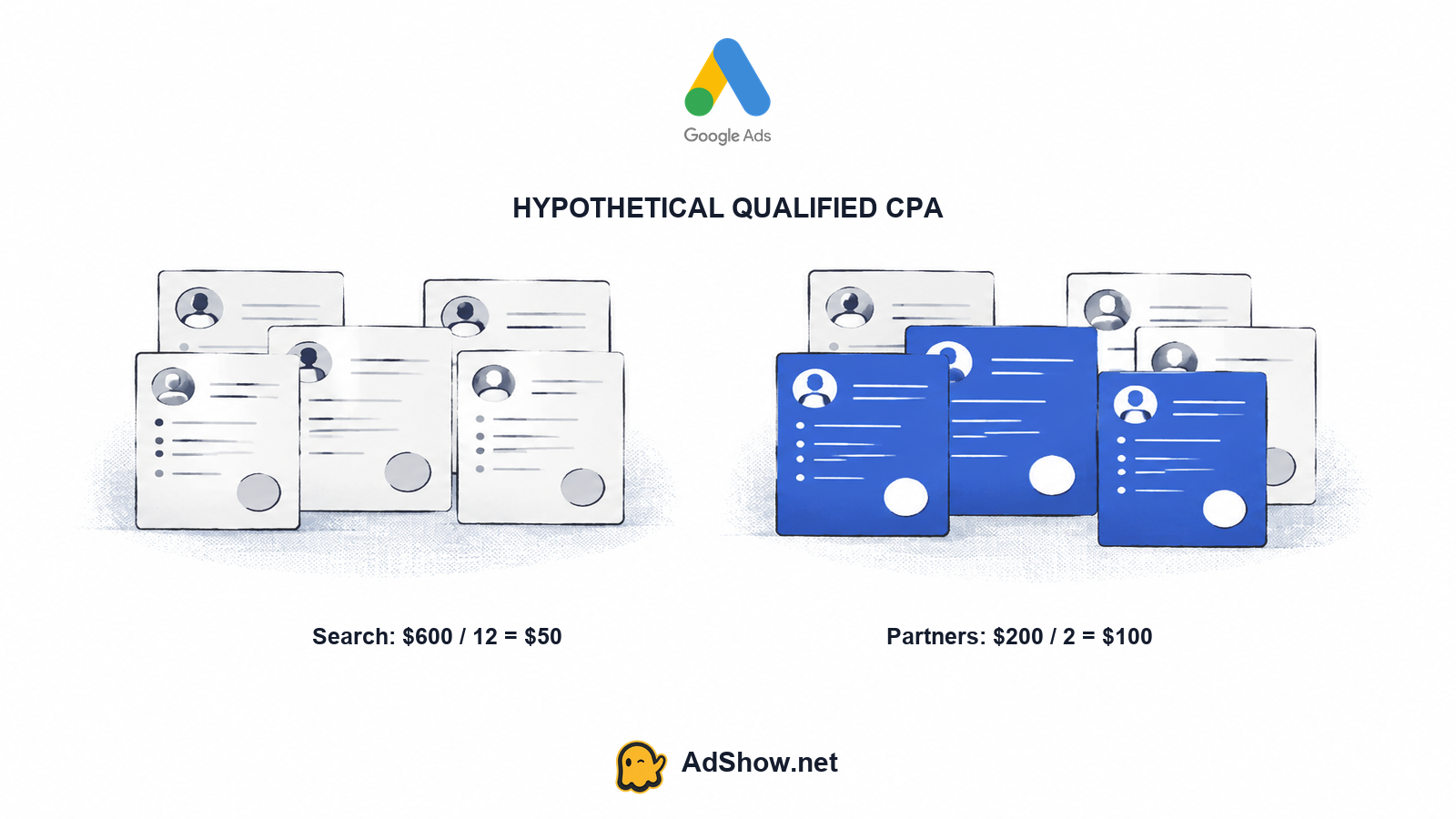
For example, suppose your maximum acceptable qualified CPA is $75. Google Search spends $600 and generates 20 reported leads, of which 12 become qualified. Its reported CPL is $30, while its qualified CPA is $50. Search Partners spend $200 and also generate 20 reported leads, but only 2 become qualified. Their reported CPL is $10, while their qualified CPA is $100. The partner segment looks three times cheaper on reported CPL, yet it is twice as expensive on qualified CPA and fails the $75 loss cap. On this sample, turning partners off or reducing their allocation is reasonable.
The calculation is hypothetical, and the sample is too small to guarantee a long-term result. A decision should use enough observations to account for normal variation, sales-cycle timing and the value of different qualified outcomes. If a partner lead takes 30 days to qualify, judging it after three days can create a false negative. Conversely, allowing a weak segment to run indefinitely because eventual qualification is possible is not a measurement plan.
Harris Eugene’s operator note: Harris Eugene's operator note: A lower reported CPL is irrelevant when the lead never reaches the qualified stage. Define the qualified-CPA loss cap before the test, then replace the hypothetical figures below with outcomes from your own CRM and conversion definitions.
Segment the Network Before Deciding
In a standard Search campaign, use the campaign's Networks setting to control whether Search partners are included. The common navigation is Campaigns, select the campaign, Settings, Networks, then clear the checkbox for "Include Google search partners" when opting out. Google can change labels and navigation, and the available controls depend on campaign type, so treat this as the standard Search path with a UI variation caveat. This is not a universal instruction for Performance Max, where campaign controls and placement behavior are different.
Keep the same date range, campaign settings, bidding context and conversion actions while reviewing the comparison.
Use the Segment control in campaign reporting and choose Network, commonly shown as Google Search, Search partners and Display where applicable.
Review Cost, Clicks, Conversions and conversion action definitions for each network segment rather than relying only on the account-level total.
Map reported conversions to CRM stages such as accepted lead, sales-qualified lead, opportunity or another documented qualified outcome.
Check conversion delay before declaring a segment good or bad, and record the date range and qualification window used.
Google's segmentation guidance describes Network, including Search partners, as a way to compare Google Search, partner traffic and Display, and separately highlights Days to conversion when interpreting recent performance. Read the official segmentation guidance beside your own CRM definitions. The interface may not expose the same level of partner detail for every campaign, and you should not assume an individual partner list is available for all Search campaigns.
A Scoped Opt-Out Test
If current data suggests that partners miss your qualified CPA target, run a scoped opt-out test with a written baseline. Record spend, clicks, reported conversions, qualified outcomes, qualification rate, qualified CPA and conversion lag for a comparable pre-test period. Then change one primary variable: the Networks setting. Keep offers, landing pages, budgets, targeting, search terms and sales handling as stable as practical.
Define the loss cap before the test. For example, specify the maximum qualified CPA or qualification-rate deterioration that would justify stopping the partner allocation.
Use comparable periods or a defensible control design, while recognizing that auctions, demand and seasonality can still change.
Hold the offer and lead follow-up process stable so a creative or sales change is not mistaken for a network effect.
Allow for the campaign's normal conversion delay and qualification window. There is no universal seven-day guarantee that will settle the question.
Document the decision and revisit it when volume, bidding strategy, conversion actions or CRM mapping changes.
A clean test does not require claiming certainty from a short run. It requires making the decision rule explicit and limiting the number of explanations for the result. If partner volume is too low for a meaningful comparison, state that limitation instead of manufacturing a conclusion.
Separate Weak Leads From Invalid Clicks
A lead that never becomes qualified is not automatically proof of bot traffic. Weak intent, poor fit, misleading queries, duplicate submissions, bad form design, slow follow-up and mismatched conversion actions can all reduce qualification. Invalid clicks are a separate category involving activity Google identifies as illegitimate, such as accidental or automated interactions. Do not equate poor sales quality with invalid clicks, and do not promise refunds merely because a partner lead is weak.
Recent advertiser discussions illustrate why broad claims are unreliable. A July 31, 2026 Reddit discussion includes negative experiences and a counterexample from a B2B ecommerce advertiser, with conflicting opinions about partner intent. Those comments are anecdotal and unverified, so they are useful as prompts for measurement, not as evidence that all Search Partner impressions are fake. The practical response to Google Ads getting clicks but no leads is to inspect queries, conversion definitions, qualification data and follow-up before assigning blame.
When Measurement Cannot Map Quality
The on-or-off decision becomes less certain when the CRM cannot identify whether a qualified lead originated from Google Search or Search Partners. Network totals can show aggregate performance, but aggregate totals cannot prove that the partner segment produced the qualified outcomes. If the conversion action fires for every form completion and the source is lost before CRM import, you may be able to compare reported CPL but not qualified CPA.
In that situation, treat the missing mapping as a measurement limitation. You can run a scoped opt-out test and compare total qualified outcomes over comparable periods, but other changes may explain the result. Improving source capture, conversion-action definitions and offline conversion imports should be part of the operating work. Your broader Google Ads keyword strategy also matters because traffic quality is shaped by intent and query control, not only by the network toggle.
Where Agency Account Access Fits
AdShow provides self-service access to agency advertising accounts for operational use. The service includes visible marketplace offers, dashboard requests, funding or top-up workflows and issue reporting. That access does not mean a different Search Partner network, premium traffic, guaranteed lead quality, immunity from policy decisions or a way around advertising rights and responsibilities. Network allocation still belongs in the campaign measurement process described above.
The practical recommendation is conditional. Keep Search Partners enabled when segmented, delayed and qualified data shows acceptable economics. Turn them off in a standard Search campaign when the segment exceeds your loss cap or cannot be distinguished well enough to manage risk. Re-test only when your offer, conversion tracking, sales process or available volume creates a materially better measurement case.
For operational access to Google agency advertising accounts, review the available AdShow options. Explore Google agency ad accounts
Questions from recent advertiser discussions
Are Google Search Partners always bad for lead generation?
No. Search Partners can produce useful leads for some campaigns and weak leads for others. Keep them on when qualified outcomes justify the spend. Turn them off when qualified CPA misses your loss cap or when measurement cannot distinguish partner quality.
How do I turn off Search Partners in Google Ads?
For a standard Search campaign, open Campaigns, select the campaign, go to Settings, open Networks and clear the checkbox for Include Google search partners. Google may adjust labels or navigation, and this path does not apply universally to Performance Max or every other campaign type.
Should I compare Search Partner CPL with Google Search CPL?
Compare CPL as a diagnostic, but make the allocation decision using qualified CPA or another downstream value metric. A cheaper reported lead can be more expensive when fewer leads become accepted, sales-qualified or revenue-producing opportunities.
Can Google tell me which individual Search Partner produced each lead?
Not necessarily. Reporting and control vary by campaign, and an individual partner list is not available for every Search campaign. If your CRM cannot map partner traffic to qualified outcomes, report that limitation and use a carefully scoped opt-out test rather than claiming precise partner-level economics.
Sources and scope
Official documentation defines platform behavior. Recent community discussions are used only to illustrate reported symptoms and questions; they do not prove the cause of an individual account outcome.
Google Ads: Search Network — Current official help: Search partners are included by default for Search campaigns; Networks checkbox permits opt-out. Search partner CTR does not affect Google Quality Score. Partner reporting/control varies by campaign.
Google Ads: segments — Network (with search partners) compares Google Search, partners and Display; Days to conversion explains lag before interpretation.
Recent advertiser debate about search partners — July 31 2026 discussion questions traffic quality, with both negative experiences and a B2B ecommerce counterexample. Allegations are unverified; do not call all partner impressions fake.