Facebook Ad Account Disabled Because Payment Failed? Fix the Billing Issue Before You Appeal
A Facebook ad account can be disabled with a “payment failed” message even when the balance appears to be $0 or prepaid funds are visible. Do not assume that adding another card, topping up again or creating a new account will fix it. First identify whether Meta is showing an amount due, a failed payment method, a pending billing event, a payment-profile restriction or a separate account review.

August 11, 2026
Table of contents
The short answer: resolve the payment state, not just the visible balance
When Meta says it could not process your payment, check the payment activity and the ad-account status before changing anything. A genuine unpaid amount should be paid through the account's billing flow using a valid payment method. But a $0 balance, successful recent charge or prepaid funds do not always prove that the restriction has cleared: there may be a pending transaction, an internal billing hold, a payment-profile issue or a separate risk review.
Recent advertiser discussions describe this exact contradiction: valid cards and prepaid funds were visible, yet the account remained disabled with a payment message. Those reports are not proof of a universal Meta bug. They do show why the right next step is a complete billing case with evidence—not repeated random card attempts.
Need a new access workflow only after the diagnosis? Review the current Facebook agency ad account options at AdShow. AdShow lets buyers request accounts, manage top-ups and report account issues through a dashboard rather than tracking every operational step in chat.
What recent advertiser discussions reveal about this error
This is not a theoretical edge case. In public 2026 support discussions, advertisers describe three recurring versions of the same message. These are individual reports, not a diagnosis or a promise that every account has the same cause. They are useful because they show which screenshots and questions matter when a billing case is opened.
A real amount due, but every payment attempt fails: in an August 2026 advertiser report, the buyer saw an unpaid balance, tried more than one payment method, and said their bank did not receive a charge attempt. The useful support evidence is the amount due, attempted-payment time and issuer-side result.
$0 balance, but the account is still disabled: a February 2026 multi-reply discussion describes a pending payment state where the visible balance was zero while advertising remained blocked. The lesson is not to assume that a zero balance clears the account; capture the pending entry and restriction notice together.
Available funds or a valid card, but the billing message remains: a June 2026 advertiser thread reported successful payment history and prepaid funds alongside the same disabled message. This is why a case should state the exact mismatch rather than merely saying that the card is valid.
The shared pain point is not just a declined card. It is the gap between what the billing screen says, what the bank or payment provider sees, and the restriction that still prevents delivery. A concise timeline turns that confusion into something a billing reviewer can investigate.
First, separate these four payment-related states
“Payment failed” is often used as if it describes one problem. In practice, you need to identify which state the interface is actually showing.
Amount due: a valid charge is outstanding and needs to be settled.
Payment method failure: Meta attempted a charge and the card, PayPal account or bank authorization did not complete.
Pending or mismatched billing activity: the displayed balance, payment activity and restriction message do not agree.
Account or payment-profile restriction: the ad account or payment profile remains disabled after the apparent balance is settled.
The first two may be resolved through normal billing action. The last two require better documentation and the correct support/review path. Do not call every restriction a “billing bug,” and do not treat every billing message as permission to make a new account.
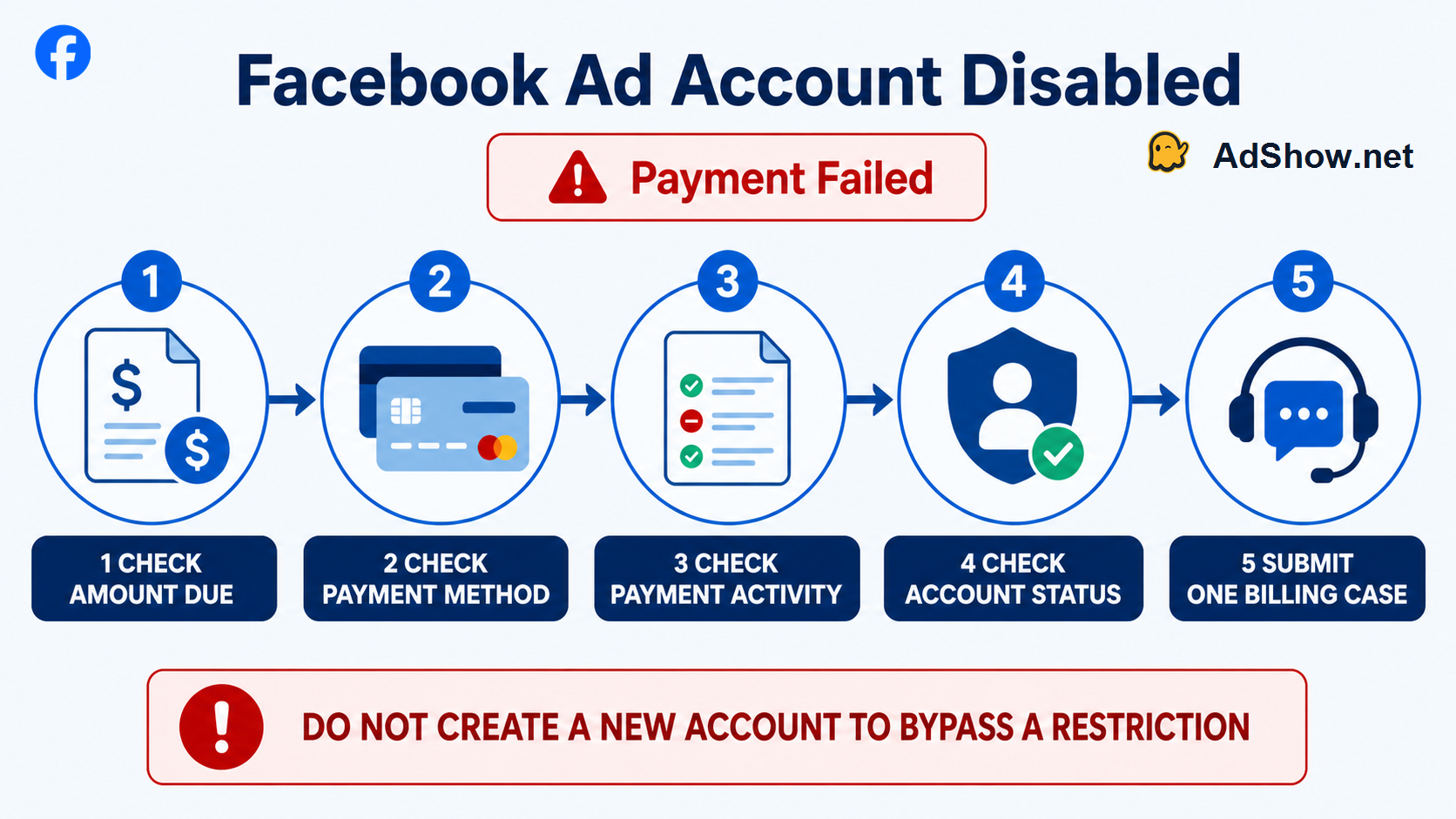
Check the money, payment method, activity and account state in that order before opening one billing case.
1. Check whether there is an actual amount due
Go to the affected ad account's billing and payment activity area. Record the amount due, currency, payment due date, last successful charge, last failed attempt and any pending item. Do this before adding a card or transferring money.
If Meta displays a real outstanding amount, settle it using the billing flow. Confirm that the payment activity changes from failed or pending to completed. A card can be valid in general but still fail a specific authorization because of available funds, credit limit, bank controls, expiry details or a payment-provider restriction.
Do not pay an amount twice simply because the interface is slow to update. Save a screenshot of the confirmation and wait for the payment activity to reflect the completed state. If Meta offers a retry action for the failed charge, use that specific action rather than creating several overlapping attempts.
2. Verify the payment method without cycling through cards
Check the payment method's expiry date, billing address, available funds or credit, issuer restrictions and whether the payment profile belongs to the legal advertiser. If a card was recently replaced, lost, frozen or removed, confirm which method Meta tried to charge when the restriction occurred.
Adding multiple unrelated cards, changing payment methods repeatedly or making many small test payments may create more noise in the evidence trail. Use one valid method that the advertiser controls, then document the result. If the bank declined an authorization, ask the bank for the reason and date; do not ask it to “remove a Meta ban,” because it cannot.
Meta's help content for ad-account payment methods confirms that a method is required to create and publish ads and directs payment-failure troubleshooting to the business help flow. That distinction matters: a missing card is one issue; a disabled ad account that will not accept a new card is another.
3. Treat a $0 balance plus “payment failed” as a mismatch to document
A $0 displayed balance is useful evidence, but it is not a self-service reset button. Recent 2026 advertiser reports describe accounts with $0 due, successful cards or prepaid funds that still showed “ad account disabled” because a payment could not be processed. In other reports, the original transaction remained pending even after the buyer added another payment method.
These reports do not establish why Meta made each decision. They do establish the correct support question: “The ad account is disabled for payment failure, but payment activity shows [exact state] and the displayed amount due is [exact amount]. Please review the billing restriction and identify the unresolved transaction or required action.”
Include screenshots of the restriction notice, amount due, payment activity, successful payment or prepaid balance, and the payment-method status. Do not send your full card number, CVV, bank login or a password to anybody claiming they can remove the restriction.
4. Check whether the restriction is broader than one failed charge
Open Account Quality and Business Support Home, then identify the scope of the restriction. Is the affected object only one ad account? Is the business portfolio restricted? Is the personal payment profile disabled? Is there also a security, policy or identity-verification notice?
These distinctions change the remedy. A settled balance will not by itself restore a payment profile disabled after a security event, and a payment failure will not explain a separate policy restriction. If you see unfamiliar admins, payment methods, ads or login sessions, secure the Facebook account first: change the password, enable two-factor authentication, end unknown sessions, remove unauthorized people and report the compromise through the appropriate Meta route.
Never create a new Facebook profile or new ad account to bypass an unresolved restriction. That can create a separate enforcement issue and makes your case harder to explain. Ask Meta whether a new account is permitted only after the existing case has been reviewed.
5. Submit one complete billing case
Support teams can act faster on a clear timeline than on a message saying “my card works.” Prepare one evidence pack:
ad account ID and business portfolio ID;
exact restriction text and the date/time it appeared;
amount due and currency shown in billing;
payment activity showing failed, pending and successful events;
the last four digits only of the payment method, if Meta asks for it;
bank confirmation of any declined or completed authorization, without sensitive banking credentials;
confirmation that the payment method belongs to the advertiser;
any related Account Quality, security or verification notice.
Use the in-product Business Help/Support route and select the billing or payment-failed path that matches the message. Avoid duplicate cases and repeated appeals unless Meta instructs otherwise. Each duplicate can fragment the timeline you need the reviewer to see.
When an agency ad account is relevant—and when it is not
An agency account is not a way to escape Meta enforcement or guarantee that ads will run. It can be relevant after a buyer has followed the proper billing/review process and needs a more organized way to request account access, fund an eligible account and track operations.
AdShow provides agency advertising accounts for Facebook/Meta, Google Ads, TikTok and other major advertising platforms. The difference is operational: account requests, top-ups, notifications and issue reports are managed through a dashboard. Buyers can inspect the current Facebook agency ad account offer and read the AdShow FAQ before registering or funding.
Availability, fees, funding treatment and any replacement eligibility depend on the selected offer and its terms. An agency account does not promise a successful appeal, approval, spend or exemption from Meta policy.
Questions from recent advertiser support discussions
These questions reflect recurring 2026 advertiser reports. They identify common symptoms; Meta must confirm the reason and outcome for any individual account.
Why is my Facebook ad account disabled for payment failed when I owe $0?
The visible balance may not reflect a pending transaction, failed authorization, payment-profile restriction or another account review. Capture the mismatch and ask Meta billing support to identify the unresolved state.
Will adding prepaid funds automatically re-enable my ad account?
No. Prepaid funds can show that money is available, but they do not automatically clear every billing or account-level restriction. Check payment activity and the exact restriction scope.
Should I add several backup cards after Meta says payment failed?
Use a valid advertiser-controlled method and document its result. Repeatedly cycling through unrelated cards can complicate the evidence trail and may not address the underlying billing state.
Can I create a new Facebook ad account after a payment-failed restriction?
Do not create another account to bypass an unresolved restriction. Complete the billing/review process and ask Meta whether new access is permitted if the current account cannot be restored
What should I send to Meta billing support?
Send the account ID, exact error, billing balance, payment activity, status screenshots and only the payment information Meta specifically requests. Never send passwords, CVV codes or full card numbers
Research note: This guide distinguishes current official Meta help from recent user-reported symptoms. Community posts are not proof of a platform-wide cause or a guaranteed fix. Use Meta's official billing and Business Help paths for account-specific decisions.