Meta Ads Suspended for Evading the Review Process: Causes, Fixes, and Appeal Guide 2026
A restriction for evading review is one of Meta's most serious advertising-account actions. Recovery begins with a complete audit of the advertiser, business assets, advertising history, destinations, identities, and technical connections.

August 7, 2026

Table of contents
Key point: Correct the underlying cause before requesting a review. Do not create or rotate accounts, Pages, profiles, or domains to bypass the restriction.
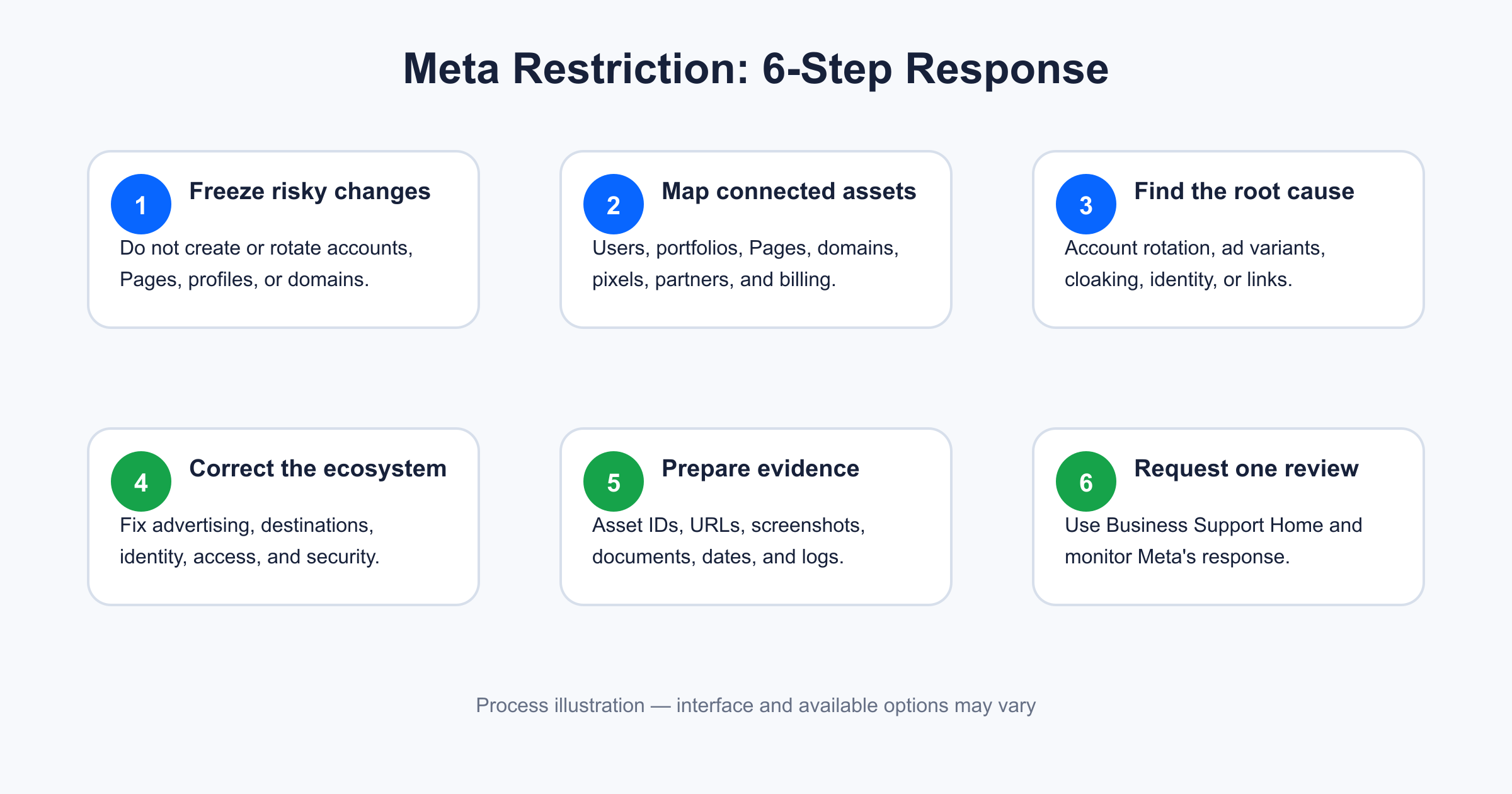
Figure 1. A disciplined response starts by freezing risky changes, mapping all connected assets, finding the root cause, correcting the full business ecosystem, preparing evidence, and submitting one complete review request.
What does “evading the review process” mean on Meta Ads?
Meta reviews advertisements for compliance with its Advertising Standards. The review can cover creative, text, targeting information, and the ad destination. Ads may also be reviewed again after they begin running.
Meta states that it may restrict businesses that are evading or attempting to evade its review process and enforcement actions. It also considers severe or repeated violations, inauthentic accounts, and connections to abusive business assets. These factors are described in Meta's official ad review and account-restriction guidance.
Review evasion can include:
Creating another ad account or business portfolio after a restriction to continue the same activity.
Moving a rejected offer to another Facebook Page, Instagram account, domain, or app.
Repeatedly changing minor words, images, or URLs while leaving the noncompliant offer unchanged.
Showing reviewers and users materially different landing-page content.
Using redirects, tracking links, device rules, or geographic rules to conceal the real destination.
Using inauthentic personal profiles to create or control business assets.
Attaching new assets to a network of Pages, accounts, or businesses previously restricted for abuse.
Meta does not always disclose the exact technical signal that caused a restriction. A proper investigation therefore needs to cover the full asset network, not just the last rejected advertisement.
What the restriction feels like in practice
The restriction often appears when campaigns are generating leads or sales. Delivery stops, the business loses its acquisition channel, and the team may not know whether Meta restricted the user, ad account, Page, business portfolio, payment function, or several assets together.
The most damaging response is usually an improvised attempt to resume delivery immediately. Common reactions include opening another ad account, borrowing a colleague's profile, creating a replacement Page, changing the domain, or asking several agencies to connect the same assets.
These actions create more relationships for Meta to evaluate and may reinforce the appearance of evasion. In the cases I review, the best recovery work starts with restraint: preserve the current state, document it, and understand what Meta has actually restricted.
Before requesting a review, the advertiser should be able to answer:
Which exact asset or user is restricted?
What policy and historical activity may have produced the decision?
Which connected assets could share risk signals?
What was corrected, where, and when?
What evidence confirms the correction?
What process prevents recurrence?
Five common root causes and how to fix them
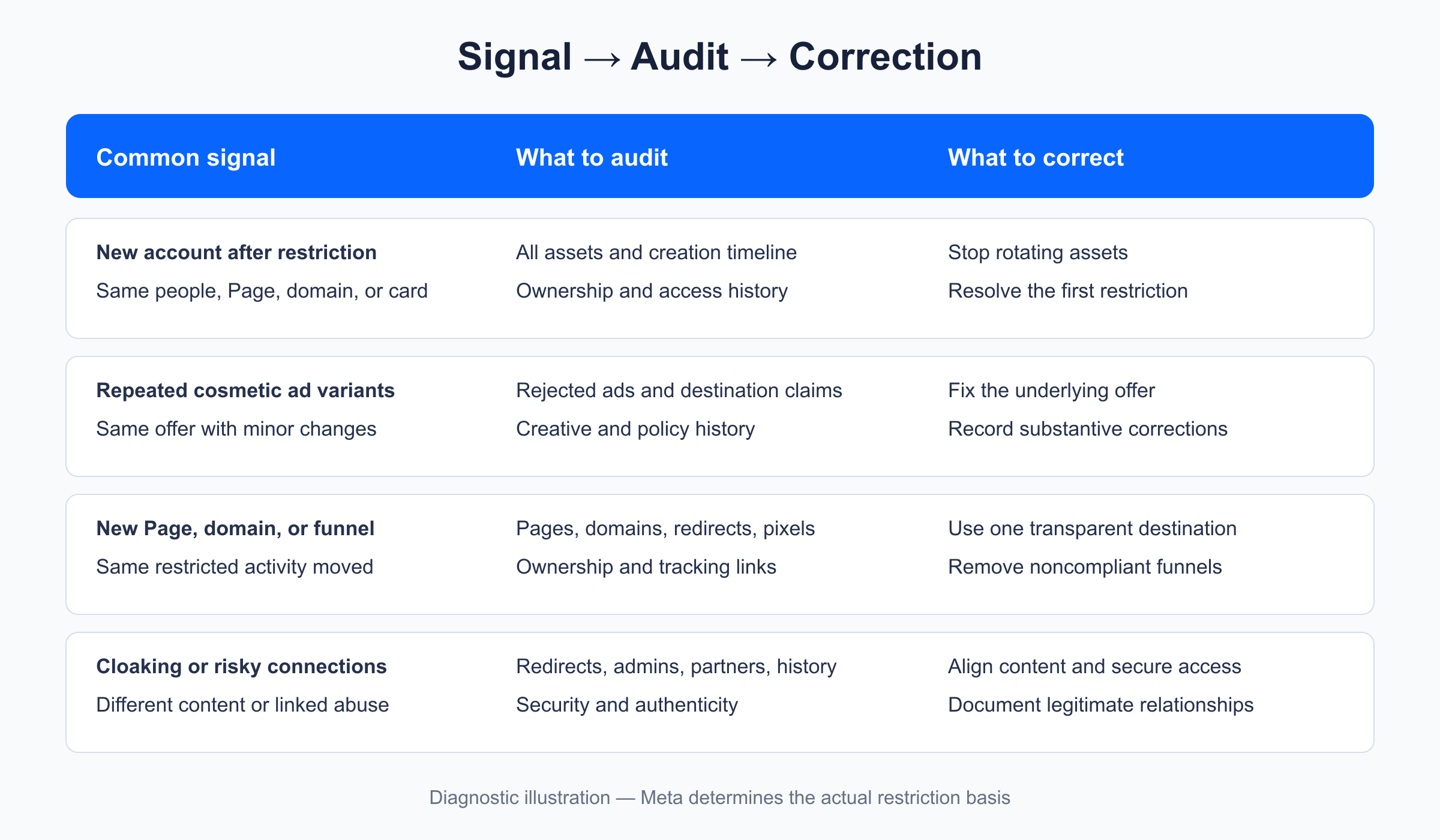
Figure 2. The same restriction label can arise from different account, identity, creative, destination, and asset-network problems; each root cause requires different evidence.
Cause 1: Creating or rotating ad accounts after a restriction
An advertiser may create another ad account because the original account can no longer publish ads. Even if the intention is business continuity, the new account may appear to be a way around an active restriction.
What to audit
Every active, closed, disabled, and restricted ad account.
Every business portfolio that owns or has access to those accounts.
Personal profiles with full control, finance access, or campaign access.
Shared Pages, Instagram accounts, domains, pixels, catalogs, apps, and payment methods.
The date each asset was created relative to previous restrictions.
What to correct
Stop creating, purchasing, borrowing, or connecting additional accounts.
Identify the first restriction in the timeline and address its root cause.
Remove access belonging to former employees or unauthorized partners where appropriate.
Document legitimate reasons for multiple accounts, such as separate legal entities or distinct business units.
Do not conceal connected accounts in the review request.
Cause 2: Repackaging rejected ads to obtain approval
Changing a headline, cropping an image, or creating another ad ID is not a meaningful correction when the underlying product, claim, or landing page remains noncompliant. Repeated cosmetic variants can look like an attempt to test which version escapes enforcement.
What to audit
Rejected ads and their stated policy reasons.
Similar creatives submitted after each rejection.
Claims about results, earnings, health, personal attributes, scarcity, pricing, and endorsements.
Reused videos, thumbnails, copy, and calls to action across Pages or accounts.
Whether the destination still makes claims removed from the ad itself.
What to correct
Stop resubmitting cosmetic variations.
Correct the underlying offer and customer journey.
Remove unsupported claims and prohibited implications from both the ad and destination.
Make pricing, eligibility, material terms, subscriptions, and refund conditions clear.
Record the ad IDs and exact changes made.
Cause 3: Moving the same offer to a new Page or domain
A Page, domain, or landing page is not a clean slate when it promotes the same restricted activity. Rapidly switching destinations after rejections can create a strong review-evasion pattern.
What to audit
All Pages and Instagram accounts that promoted the offer.
Current and historical domains, subdomains, funnels, and link shorteners.
Domain ownership and business-verification records.
Redirect chains and tracking templates.
Reused privacy policies, contact details, pixels, and checkout providers.
What to correct
Stop rotating Pages and domains.
Select the legitimate business destination and make it fully transparent.
Align business identity, contact information, terms, privacy information, and refund details.
Remove obsolete noncompliant funnels rather than redirecting them to replacements.
Verify domains and ownership information where Meta requests it.
Cause 4: Cloaking or inconsistent landing-page experiences
Cloaking means materially different content is presented to reviewers and users. It can be intentional, but it may also come from personalization software, fraud tools, geolocation logic, device routing, split testing, or compromised scripts.
What to audit
The complete path from ad click to final conversion.
Server-side and client-side redirects.
Differences across country, device, browser, login state, and referral source.
Link trackers, URL shorteners, affiliate platforms, CDN rules, and plugins.
Third-party scripts and unauthorized website changes.
What to correct
Remove rules that hide policy-relevant content from reviewers.
Direct users to a stable and consistent destination.
Retain measurement only when it does not conceal the offer or destination.
Test the journey from several devices and networks.
Save before-and-after redirect maps, screenshots, and technical change records.
Cause 5: Inauthentic profiles or connections to restricted assets
Meta considers whether advertisers use inauthentic user accounts and whether they manage assets connected to abusive assets. A legitimate business may also inherit risk through an old administrator, former agency, acquired Page, shared pixel, or compromised account.
What to audit
Identity and security status of every administrator.
Two-factor authentication and recent login activity.
Current and former partners in the business portfolio.
Ownership history of Pages, Instagram accounts, domains, pixels, and catalogs.
Assets previously managed by the same agency or administrator.
What to correct
Use authentic profiles belonging to real authorized people.
Complete identity or business verification when available and requested.
Remove unauthorized or obsolete access.
Secure compromised profiles and business assets before requesting review.
Prepare contracts, authorization records, acquisition documents, and access logs that explain legitimate relationships.
Pre-appeal audit checklist
Identify whether the restriction affects a user, ad account, Page, Instagram account, or business portfolio.
Record the asset ID and restriction message exactly.
List all connected and previously connected business assets.
Stop creating or rotating accounts, Pages, profiles, domains, and payment methods.
Review every rejected ad and destination associated with the offer.
Confirm reviewers and users receive a consistent landing-page experience.
Check administrators, partners, ownership, security, and verification status.
Correct the offer and customer journey, not only the ad wording.
Preserve ad IDs, URLs, screenshots, dates, contracts, and change logs.
Prepare a concise explanation of the root cause and preventive controls.
How to request a review of a restricted Meta Ads account
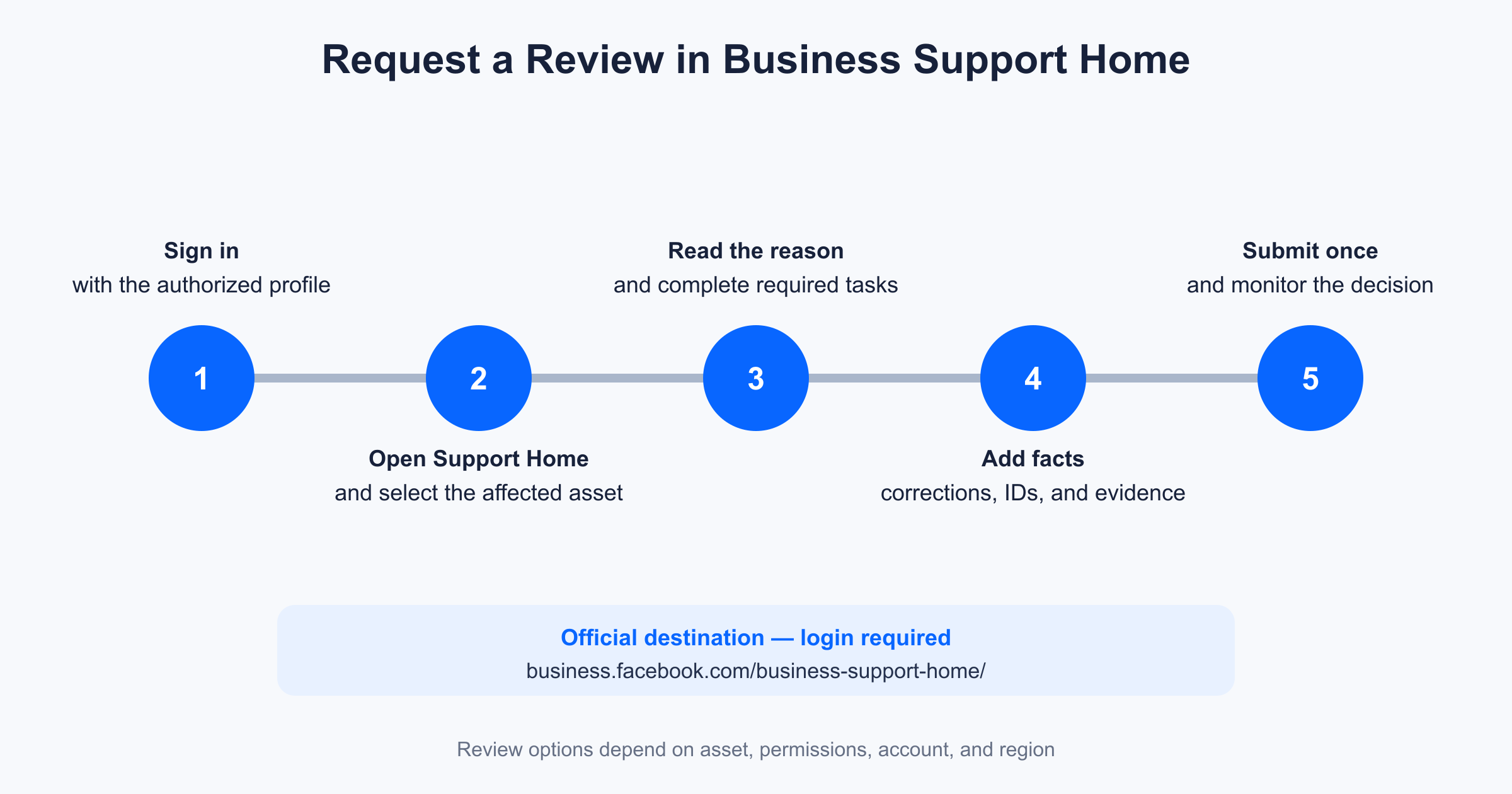
Figure 3. The review begins in Business Support Home: select the affected asset, examine Meta's stated reason, complete the required corrections or verification, and submit an evidence-based request.
Step 1: Sign in with the correct administrator profile
Use an authentic profile that has full control or the necessary permissions for the affected business asset. Do not use a newly created or borrowed profile.
Step 2: Open Meta Business Support Home
Use the official destination:
Open Meta Business Support Home
The available interface and review options depend on your login, permissions, asset type, and region.
Step 3: Select the restricted asset
Locate the affected ad account, user, Page, or business account. Read the restriction reason and review the associated policy history. If Meta requires identity, business, payment, or security verification, complete that requirement accurately.
Step 4: Complete corrections before requesting review
Do not submit the request merely to “see what happens.” Correct the connected assets, advertising activity, destination, identity, and security issues first.
Step 5: Submit a factual review request
Your explanation should follow this sequence:
restriction → root cause → affected assets → corrections → evidence → preventive controls
Meta's review form may not provide a large text field in every case. If space is limited, prioritize asset IDs, exact actions, and the most important evidence.
Step 6: Monitor Business Support Home and email
Meta says account-restriction reviews are typically completed in approximately 48 hours, although some take longer. This is guidance, not a guarantee. Avoid creating replacement assets while waiting.
Meta Ads review request template
Customize this template to match the facts. Never claim a correction or relationship that you cannot verify.
Subject: Request for review — advertising restriction for alleged review-process evasion
Hello Meta Business Support,
My name is [full name], and I am the [role] authorized to manage [legal business name]. I am requesting a review of the restriction affecting [asset type and asset ID], applied on [date].
We reviewed the affected asset, advertising history, administrators, business portfolios, Pages, Instagram accounts, domains, pixels, payment relationships, and connected partners.
Our investigation identified the following root cause: [specific factual explanation].
We completed these corrective actions:
[Correction, affected asset or URL, and completion date].
[Correction, affected asset or URL, and completion date].
[Access, identity, security, or policy control implemented].
Related assets reviewed include: [asset names and IDs with a short explanation of each relationship].
Supporting evidence includes: [screenshots, ad IDs, URL inventory, redirect records, business documents, authorization agreement, security records, and change log].
We are not creating or using replacement profiles, Pages, ad accounts, business portfolios, or domains to bypass this restriction. [If a replacement asset was created, disclose it truthfully, explain why, and state its present status.]
To prevent recurrence, we implemented [creative review, landing-page testing, access governance, identity verification, security controls, and policy-review schedule].
Please review the restriction based on the corrections and evidence above. We are available to provide additional documentation.
Sincerely,
[Full name]
[Role and legal business name]
[Business email]
[Affected asset ID]
How to customize the appeal for each cause
Root cause | What the request should explain | Useful evidence |
|---|---|---|
New account after restriction | Timeline, ownership, reason it was created, and current status | Asset inventory, creation dates, restriction screenshots, proof activity stopped |
Cosmetic ad variations | Rejected ad IDs, underlying offer issue, and substantive correction | Before/after creative, revised claims, landing-page comparison |
New Page or domain | All old and new destinations and why changes occurred | Ownership documents, URL list, Page IDs, corrected disclosures |
Cloaking or redirects | Exact technology or rule causing inconsistent content | Redirect map, tests by device/location, plugin or CDN change log |
Inauthentic or linked assets | Identity, authorization, ownership, and connection history | Identity/business verification, contracts, access logs, security records |
What not to write in the review request
“I did nothing wrong. Enable the account immediately.”
“I bought this account, so I do not know its history.”
“We created another Page because Meta kept rejecting us.”
“Everything is fixed,” without asset IDs or evidence.
“Our agency account cannot be disabled.”
“We guarantee Meta will restore the account within 24 hours.”
A useful review request reads like a short incident report, not a complaint or sales message.
Personal ad account vs. agency-managed Meta Ads account
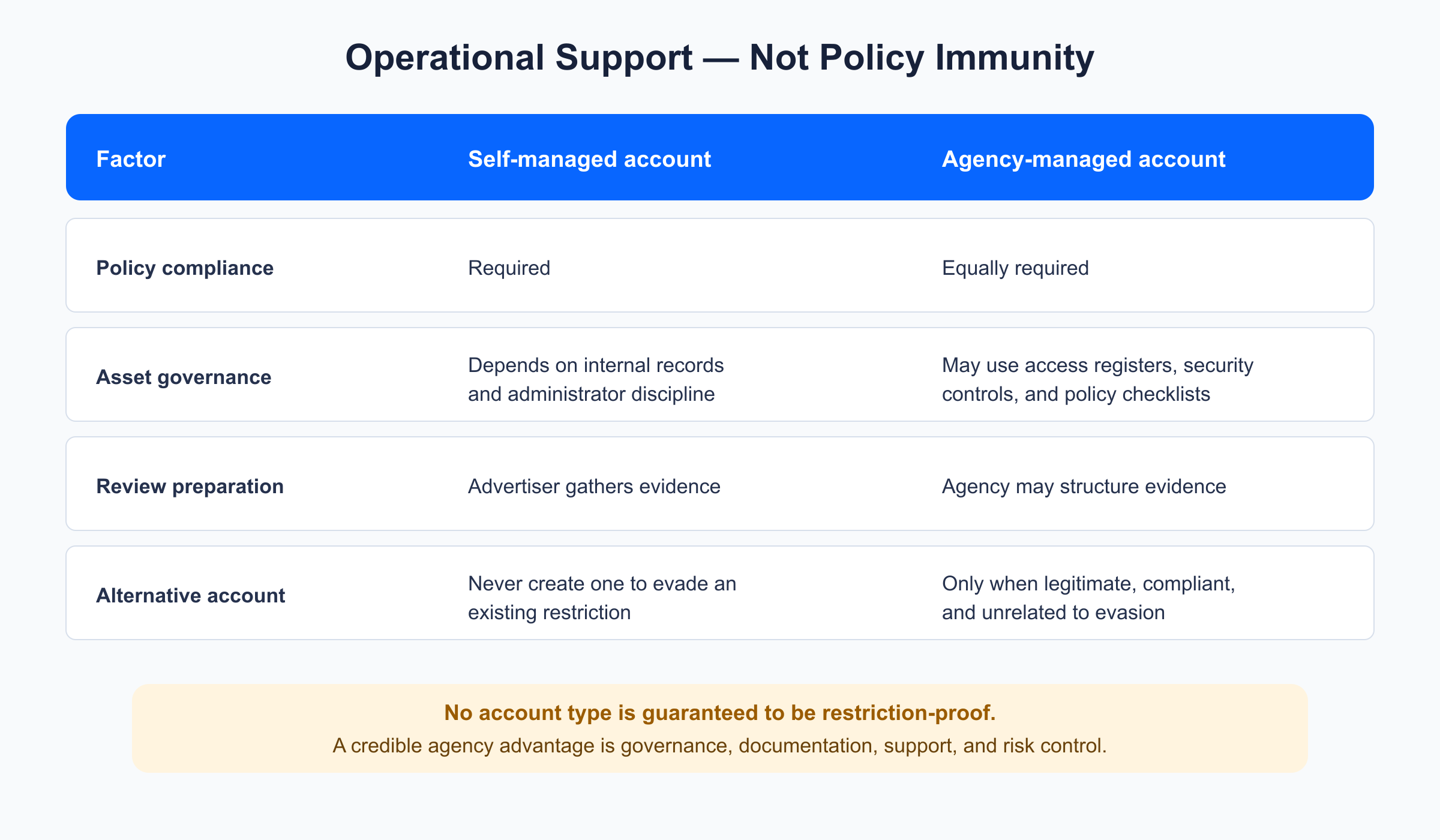
Figure 4. Agency management can improve governance, documentation, security, and review preparation, but every account and business asset remains subject to the same Meta policies.
Factor | Self-managed account | Agency-managed account |
|---|---|---|
Meta policy obligations | Full compliance required | The same full compliance required |
Identity and access controls | Managed internally | May follow documented agency controls |
Creative and destination review | Depends on internal expertise | May use policy and technical checklists |
Connected-asset records | Often incomplete | Can be standardized by a capable agency |
Review-request preparation | Advertiser investigates independently | Agency may organize facts and evidence |
Restriction risk | Exists when policies are violated | Still exists when policies are violated |
Reinstatement authority | Meta | Meta |
An agency-managed account should be called “stronger” only in an operational sense: better support, access governance, documentation, and risk controls. It does not receive immunity from Meta's Advertising Standards and must never be used to evade a restriction.
How Adshow.net supports Meta advertisers
Adshow.net provides Facebook agency ad accounts and operational support intended to help advertisers follow Meta's platform policies.
For a review-evasion restriction, Adshow.net can:
Provide an initial support response within 24 hours.
Audit users, ad accounts, business portfolios, Pages, Instagram accounts, domains, pixels, and partner access.
Review rejected advertising and landing-page history.
Help the advertiser document corrections and organize evidence.
Guide the advertiser through Business Support Home and monitor the case.
Consider an alternative account only when legitimate, policy-compliant, and not used to bypass an active restriction.
Important disclosure: The 24-hour commitment refers to Adshow.net's initial support response. It does not mean that Meta will review or restore an account within 24 hours. Meta alone controls the review process and final decision.
Customers must provide truthful information and cooperate with every correction. No agency can make fake profiles, cloaking, misleading ads, or restriction evasion compliant.
Frequently asked questions
Can Meta restore an ad account restricted for evading review?
Yes, if Meta accepts the review request and concludes that the activity complies or that the restriction was incorrect. Restoration is not guaranteed.
Should I create another Facebook ad account while waiting?
No. Creating replacement assets to continue the same restricted activity can reinforce the review-evasion concern.
Can I use another Page or domain?
Not to bypass enforcement. A legitimate change must be transparent, documented, and unrelated to an attempt to continue noncompliant activity.
Where do I appeal a Meta advertising restriction?
Meta directs advertisers to Business Support Home to monitor compliance and request review when the option is available.
How long does the Meta review take?
Meta states that restriction reviews are typically completed in about 48 hours, but some cases take longer. No outside agency controls that timing.
Can a Meta agency account bypass a restriction?
No. An agency account must comply with the same standards. Using it to evade enforcement can place the advertiser and connected agency assets at further risk.
What if the review option does not appear?
Confirm that the login has the required permissions, select the correct asset, complete any verification or security tasks, and check Business Support Home for available support paths. Options can differ by account and region.
What should I do if the first request is rejected?
Reopen the investigation and request another review only when the interface permits it and you have a meaningful correction, clarification, or new evidence. Do not rotate assets or submit repetitive messages.
Final recommendation
A Meta Ads restriction for evading review cannot be solved safely by finding another route around enforcement. Freeze new asset creation, reconstruct the asset history, correct the underlying advertising and business issues, document every change, and submit a transparent review request.
Adshow.net can provide an initial support response within 24 hours and help structure the compliance review. Meta retains complete authority over review timing and reinstatement.
Official Meta resources
Disclaimer: This article provides general educational information and is not affiliated with or endorsed by Meta. Policies, interfaces, and review options can change. Meta alone determines account reinstatement.