Microsoft Ads Active but Not Spending? Fix Zero Impressions in This Order
Microsoft Ads active but not spending? Diagnose zero impressions in order—from account and billing blocks to approvals, targeting, bids and low volume

August 8, 2026
Table of contents
Your Microsoft Ads campaign says Active or Eligible, yet impressions remain at zero and the account spends nothing. The natural reaction is to increase bids, broaden match types or rebuild the campaign. That is often the wrong first move.
An enabled campaign is only permission to enter Microsoft Advertising's delivery process. It does not prove that the account can bill, the ads are fully approved, the targeting can reach an audience, or the bid can win an auction.
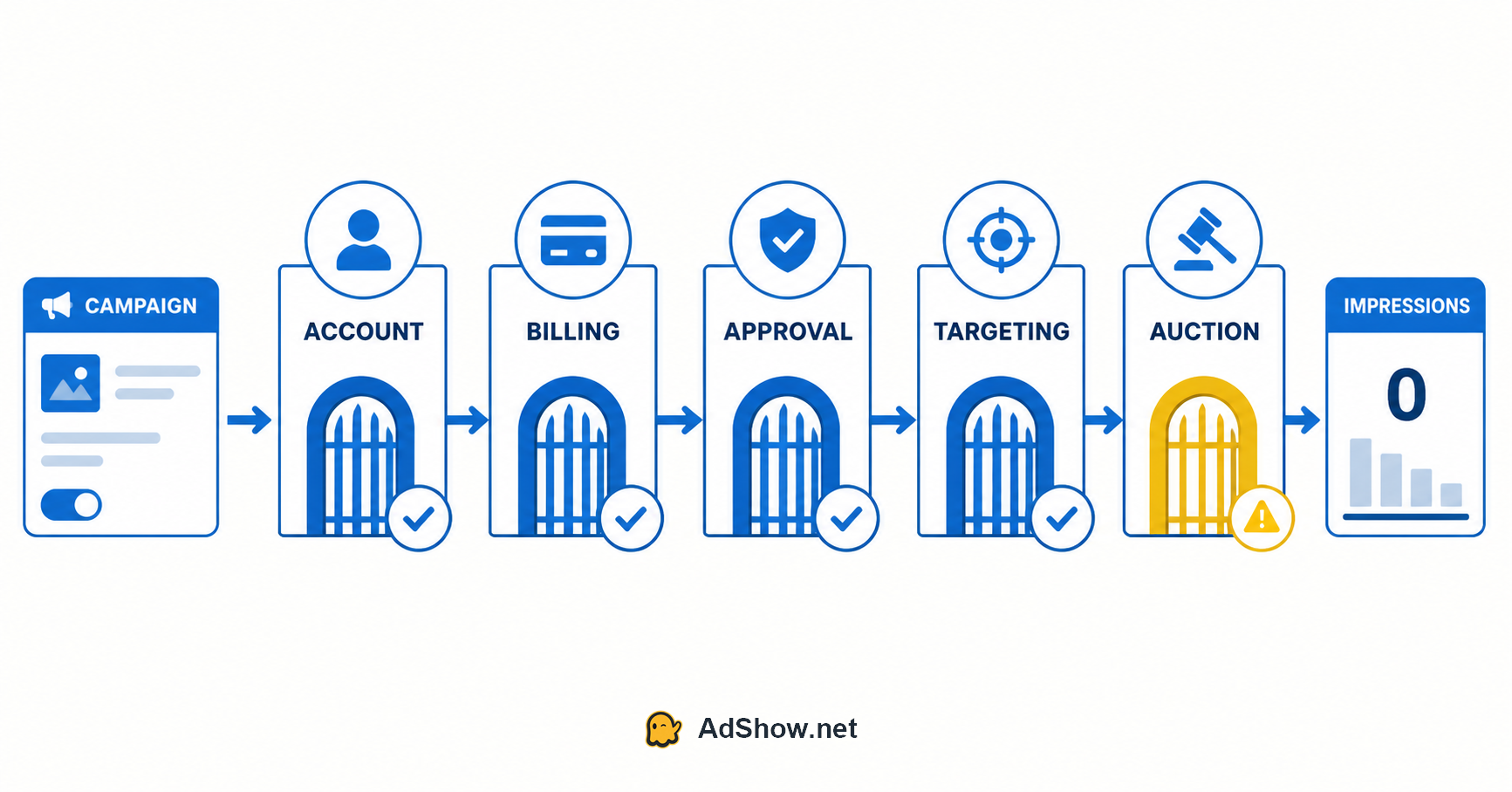
After troubleshooting paid-search accounts for years, the fastest approach I have found is to inspect delivery in a fixed order:
Account → Billing → Approval → Targeting → Auction → Measurement
If a gate near the beginning is closed, changes made later in the chain cannot restore delivery. Raising a keyword bid cannot remove an account hold. Adding broad match cannot fix a zero-balance prepay account.
The 60-second diagnosis
Before editing a campaign, record the answers to these questions:
Does the account show Hold, Inactive, Pending, Processing or another error?
Does the account have a valid payment method, available prepay balance or active insertion order?
Are the campaign, ad group, ads and keywords all enabled and approved—not merely the campaign?
Does the date range include today, and has enough time passed after setup or review?
Can the selected locations, language, schedule, device and audience settings overlap with real users?
Do the keywords have measurable demand, and are bids realistic relative to the daily budget?
Is the problem truly zero impressions, or is reporting delayed, filtered or measured in the wrong account?
This sequence separates hard stops from auction weakness. A hard stop produces no eligible ad at all. Auction weakness means the ad can serve but rarely wins.
What “Active” actually means
“Active” is a local status. It may describe one campaign while a parent or child object prevents delivery.
A search ad generally needs all of the following to align:
The customer and advertising account can serve.
Billing is valid.
The campaign is enabled and inside its start/end dates.
The ad group is enabled.
At least one keyword is eligible.
At least one relevant ad is approved.
Location, language, schedule, device and audience settings leave reachable traffic.
The bid and budget are sufficient to enter and win an auction.
This is why “the campaign is active” is not a diagnosis. It is only one row in the hierarchy.
Gate 1: Check account-level delivery
Start at Tools → All accounts → Accounts summary and inspect the account status and Errors column.
Microsoft states that ads do not run when the account has an error. Current account errors can include Hold, Paused: Zero Balance, Pending: No payment method, Pending: New customer, Inactive, Paused: System Issue or Processing. Some can be corrected by the advertiser; others require Microsoft Advertising Support.
What I check first
A banner or critical alert at the top of the interface.
The exact account number selected in the account picker.
Whether another manager or agency recently changed the bill-to customer.
Whether the advertiser identity verification status affects the payment setup being used.
Whether several accounts share a card that recently failed or generated a chargeback.
Do not diagnose from memory or from the campaign screen alone. Copy the exact status message into your incident notes. “Not spending” is a symptom; Hold: declined payment is an actionable state.
According to Microsoft, an account hold can follow declined charges, overdue invoices, excessive chargebacks or suspicious changes. While the hold remains, none of the campaigns in that account are eligible to display. See Microsoft's documentation on account errors and account holds.
Gate 2: Check billing and funding
Billing deserves its own gate because “a card is attached” does not necessarily mean the account can spend.
For postpay accounts
Confirm that:
A supported payment method is present and set as primary.
The last attempted charge was not declined.
The card is not expired, blocked or above its authorized limit.
No outstanding amount is keeping the account on hold.
A backup payment method exists where available.
For prepay accounts
Confirm that:
Funds were added to the correct advertising account.
The available balance is above zero.
The chosen payment method has finished processing.
Taxes or local payment processing did not leave less usable balance than expected.
Microsoft notes that prepay accounts pause when funds run out. Card funding may be immediate but can take up to 24 hours, while some transfers can take several days. A screenshot of a completed transfer is therefore not the same thing as an available advertising balance. Review Microsoft's explanation of prepay and postpay billing.
For monthly invoice accounts
Check the insertion order, its dates, remaining amount and bill-to customer. An active campaign without a valid insertion order can still be unable to serve.
The recurring operational mistake is checking billing in the manager view but not confirming which customer is responsible for payment. If an agency or direct manager was unlinked while acting as bill-to customer, the account may enter a processing state before the owner adds a new payment method.
Gate 3: Check every approval layer
Do not stop after seeing one approved ad.
Inspect the Delivery or Status column at all four levels:
Campaign
Ad group
Ads and assets
Keywords
Look for Disapproved, Approved Limited, Under Review, paused entities and conflicts between editorial status and targeting. Also check the landing page from the location where Microsoft will crawl it.
A practical approval audit
Open the affected ad group rather than reading totals across the account.
Filter ads by anything other than approved.
Filter keywords by delivery status.
Check whether the only approved ad is attached to the same enabled ad group as the eligible keywords.
Verify that the final URL loads without login walls, geo blocks, bot protection errors or redirect loops.
Read the policy reason before editing; repeated speculative edits can restart review without solving the underlying issue.
An account may also be paused automatically after editorial rejections. Microsoft lists editorial issues, exhausted budgets, unpaid balances and imported status changes among reasons a campaign or account can be paused automatically in its guide to pausing and enabling campaigns.
Gate 4: Test whether targeting is too narrow
When account, billing and approval are clean, ask a different question:
Is there a real searcher who can satisfy every targeting condition at the same time?
Common combinations that silently remove reach include:
A small radius plus a short ad schedule.
Location targeting that uses the wrong presence/interest interpretation for the campaign's objective.
Device bid adjustments or exclusions inherited from another campaign.
An audience set to Target and bid when it was intended only for observation.
Language settings that do not match the user's query or browser context.
Exact-match keywords with very low local demand.
Negative keywords that block the intended queries.
Use controlled expansion, not permanent broadening
Change one constraint at a time and record the timestamp. For example:
Extend the ad schedule for a test window.
Remove a nonessential audience restriction.
Test a larger location only if the business can actually serve it.
Add a small set of high-intent phrase-match keywords.
If impressions appear after a single change, you have evidence. If you change location, match type, bid strategy and budget together, you may restore traffic without learning what failed—and introduce poor-quality traffic you cannot attribute.
Gate 5: Check whether the campaign can enter the auction
At this point, the campaign is technically eligible. Zero or near-zero impressions can now be an auction problem.
Bid-to-budget mismatch
Microsoft community guidance highlights the relationship between bid and daily budget. A $10 bid paired with a $15 daily budget gives the system little flexibility. The campaign may be eligible but severely limited.
Check whether:
Keyword bids are competitive for the target market.
The daily budget can support several potential clicks.
An automated bid strategy has an unrealistic CPA or ROAS target with insufficient conversion history.
A shared budget is being consumed by another campaign.
Low search volume
Use Keyword Planner and historical data to distinguish a delivery fault from a demand problem. A narrow B2B keyword in one city may genuinely receive few searches. Increasing the budget does not create search demand.
Rank and relevance
Weak relevance between keyword, ad and landing page can reduce the ability to compete even when individual interface scores appear acceptable. Review search intent, not only the numerical quality score.
Do not search for your own ad repeatedly
Your manual search is not a reliable delivery test. Location, device, audience signals, personalization and auction timing affect whether you see an ad. Use platform diagnostics, delivery columns and impression data instead.
Microsoft's accepted community guidance for a no-impression campaign points advertisers toward budget-to-bid ratio, targeting, enabled status, editorial review and account errors. See the Microsoft Q&A discussion about zero impressions.
Why imported Google Ads campaigns stop delivering
Importing Google Ads into Microsoft Advertising saves time, but it can also import assumptions that do not fit the new account.
The most common post-import checks are:
Campaign and ad-group status: a scheduled import can overwrite a status changed manually in Microsoft Ads.
Budgets and bids: currency, market size and auction economics may differ.
Automated bidding: conversion volume available in Microsoft Ads may be much lower.
Audiences: an association or targeting mode may not translate as expected.
Negative keywords: a list built for Google traffic may suppress valuable Microsoft queries—or fail to control different matching behavior.
Tracking: importing campaign settings does not prove that UET and conversion goals are recording correctly.
Network distribution: traffic sources should be evaluated separately rather than assumed to behave like Google Search.
The practical rule is simple: import structure, then re-qualify delivery settings. Do not treat an imported campaign as production-ready merely because it was profitable on Google.
What to change—and what not to change
Change immediately when you find a hard stop
Resolve an account error or hold.
Add a valid payment method or usable prepay funds.
Correct an expired insertion order.
Enable a mistakenly paused parent or child object.
Fix a clear policy or landing-page issue.
Test carefully when the campaign is eligible
Increase bids in controlled increments.
Set a daily budget that makes sense relative to expected CPC.
Relax one targeting constraint at a time.
Add a limited set of high-intent keywords with measurable demand.
Compare Microsoft-owned/select traffic and partner performance when data becomes available.
Avoid these panic moves
Creating another account to escape a restriction.
Rebuilding the campaign before recording current statuses.
Switching several settings simultaneously.
Importing the Google campaign again over live Microsoft changes.
Expanding to broad traffic simply to force impressions.
Assuming a new agency account will cure a policy, landing-page or demand problem.
The goal is not to make spend appear at any cost. It is to restore qualified, explainable delivery.
When the problem is operational infrastructure
Sometimes the campaign is not the main bottleneck. The team is waiting for a provider to confirm funding, identify the correct account, check a suspension or explain whether a replacement request is eligible—all through chat.
That is an operational problem, especially for buyers managing several accounts or markets.
AdShow's Microsoft/Bing agency ad accounts are managed through a self-service dashboard where users can review available offers and pricing, request accounts, submit top-ups and report suspended accounts without routing every action through a chat thread. AdShow also provides agency advertising accounts for Meta/Facebook, Google Ads, TikTok, Snapchat, Taboola and Outbrain.
This does not mean a different account fixes a weak keyword, narrow targeting or policy-noncompliant funnel. It means account operations, funding requests and incident reporting can be handled in a clearer system once the media buyer has identified which layer is actually failing.
For more Microsoft Advertising operations and optimization material, visit the Bing Advertising guides.
Frequently asked community questions
The questions below consolidate recurring issues raised by advertisers in Microsoft Q&A, PPC forums and Reddit discussions. The answers are editorial guidance, not official case decisions from Microsoft.
Why is my Microsoft Ads campaign active but getting zero impressions?
“Active” only confirms that the campaign itself is enabled. Check the advertising account status, payment readiness, ad-group status, ad and keyword approval, date range, targeting overlap, search volume and auction competitiveness—in that order.
How long should a new Microsoft Ads campaign take to start spending?
A newly completed account may begin operating shortly after setup, but payment processing and editorial review can add time. Microsoft states that a new customer account may be running within about 15 minutes after completing setup, while some prepay methods can take from 24 hours to several days. Diagnose the visible status rather than relying on one universal waiting period.
Can a campaign be approved and still not run?
Yes. Approval is only one gate. An account hold, zero prepay balance, missing payment method, paused ad group, narrow targeting, low search volume or weak auction position can all prevent impressions.
Should I raise bids when Bing Ads has no impressions?
Only after confirming account, billing, approvals and targeting. If those gates are clean, test a controlled bid increase and make sure the daily budget can support the expected CPC. Raising bids will not fix a hard account-level stop.
Why did Microsoft Ads stop spending after a Google Ads import?
An import can overwrite campaign status or bring across budgets, bid strategies, audiences and schedules that do not fit Microsoft traffic. Audit every delivery layer after import and review the settings used by recurring scheduled imports.
Does adding money guarantee that Microsoft Ads will deliver?
No. Available funding removes one possible blocker; it does not guarantee approval, audience reach, demand or auction wins.
Should I create a new account if the current account is not delivering?
Not until you know why delivery stopped. Creating another account does not solve campaign configuration and may create more risk if the original account is restricted. Follow the platform's support or appeal process for account-level enforcement.
When should I contact support?
Contact Microsoft Advertising Support when the account shows a status you cannot resolve yourself, such as Inactive, Paused: System Issue, an unexplained hold requiring support, or a review that remains unresolved beyond the displayed timeframe. Include the account ID, exact status, timestamps and the checks already completed.
Final diagnostic rule
When Microsoft Ads is not spending, do not begin with optimization. Begin with eligibility.
Prove that the account can serve.
Prove that billing can fund delivery.
Prove that an approved ad and keyword exist in the same enabled path.
Prove that targeting leaves a reachable audience.
Only then adjust bids, budgets and keyword coverage.
That order turns “Bing Ads is not working” from a vague complaint into a traceable operational incident—and prevents expensive changes made to the wrong layer.