TikTok Business Center Access: Protect Your Ad Accounts, Pixels and Partners Before an Admin Is Compromised or Removed
Learn how to structure TikTok Business Center access, protect ad accounts and pixels, manage partners, and avoid losing control when an admin is compromised.

August 8, 2026
Table of contents
Many people searching for TikTok Business Center simply want the login page. Media buyers usually discover the harder problem after they sign in: the Business Center opens, but the ad account, TikTok account, Pixel, audience, Shop or billing controls they need are missing.
That is not always a platform bug. In the cases we troubleshoot, it is often an access-design problem: a person was invited but not assigned the asset; an agency was added as a partner without the required permission; the Pixel belongs somewhere else; or one administrator controls the only recovery route.
TikTok describes Business Center as the central place for managing business and advertising activity, including users, advertising accounts, TikTok accounts, Pixels, catalogs, audiences, Shops, leads and finance functions. That concentration is useful—but it also means weak access design can create a large operational failure from one compromised identity or one badly handled agency handover.
This guide explains how to structure TikTok Business Center access so a team can collaborate without sharing passwords, reduce single-admin risk, locate missing assets and preserve a practical recovery path. It cannot make a business immune to hacking or TikTok enforcement.
The short answer
A resilient TikTok Business Center setup has seven characteristics:
Every person uses an individual company-controlled login and a protected recovery method.
The business has at least two legitimate administrators, as TikTok itself recommends, but Admin access is still kept to a small group.
Most operators use the Standard role and receive only the accounts and assets required for their work.
Finance permissions are separated from ordinary campaign permissions.
External agencies are connected as partners instead of receiving a client employee’s credentials.
The team knows which Business Center owns or controls each ad account, TikTok account, Pixel, catalog and Shop.
The company keeps an offline recovery file containing IDs, ownership records, contracts, billing evidence and approved contacts.
The key principle is simple: being inside the Business Center does not mean a user can access every asset inside it. A member’s basic role and the permissions assigned to individual accounts or assets are separate decisions.
Why TikTok Business Center access becomes an operational risk
Business Center centralizes work that would otherwise be spread across separate logins and informal handoffs. TikTok’s overview of Business Center emphasizes collaboration, centralization and accountability: teams can share assets while controlling who sees or changes them.
The same design creates three practical risks.
First, an Admin has broad power. TikTok states that Business Center Admins can manage members and assets and warns businesses to pay close attention to who receives that role. A compromised administrator can therefore cause more damage than a campaign operator with limited access.
Second, visibility is layered. A person can successfully log in, appear as a member, and still see no usable ad account or Pixel because the relevant asset was never assigned. This creates the familiar support message: “I have Business Center access, but nothing is there.”
Third, asset ownership and asset sharing are not the same thing. An agency may be able to operate an ad account or use a shared Pixel without owning the client’s underlying TikTok profile, Shop or data asset. If nobody documents that distinction, an offboarding or suspension becomes much harder to diagnose.
TikTok Business Center access should therefore be treated as infrastructure, not a one-time invitation task.
What advertisers repeatedly report
Public marketing forums and Reddit threads show several patterns that generic setup guides rarely address:
A client gives an agency “Business Manager access,” but the agency can see Ads Manager performance and not the TikTok profile analytics it expected.
The partner relationship exists, yet the required ad account, Pixel or audience was not separately shared.
A Pixel exists but does not appear in campaign setup because it sits under another ad account or Business Center, or the user lacks the required permission.
A Shop and ad account are both approved but live in different organizational structures, leaving the operator with an empty asset view.
A Business Center appears to disappear from the login view even though its ID can still be found through a partner workflow.
A team cannot reset access because the only administrator no longer controls the registered email address or phone number.
These reports do not prove that every similar incident has the same cause. They do reveal the questions teams repeatedly face: Which identity is logged in? Which Business Center is active? Who is Admin? Where does the asset live? Was it assigned to this member or partner?
That sequence is more useful than repeatedly logging out, clearing a browser and hoping the asset reappears.
Understand the four access layers
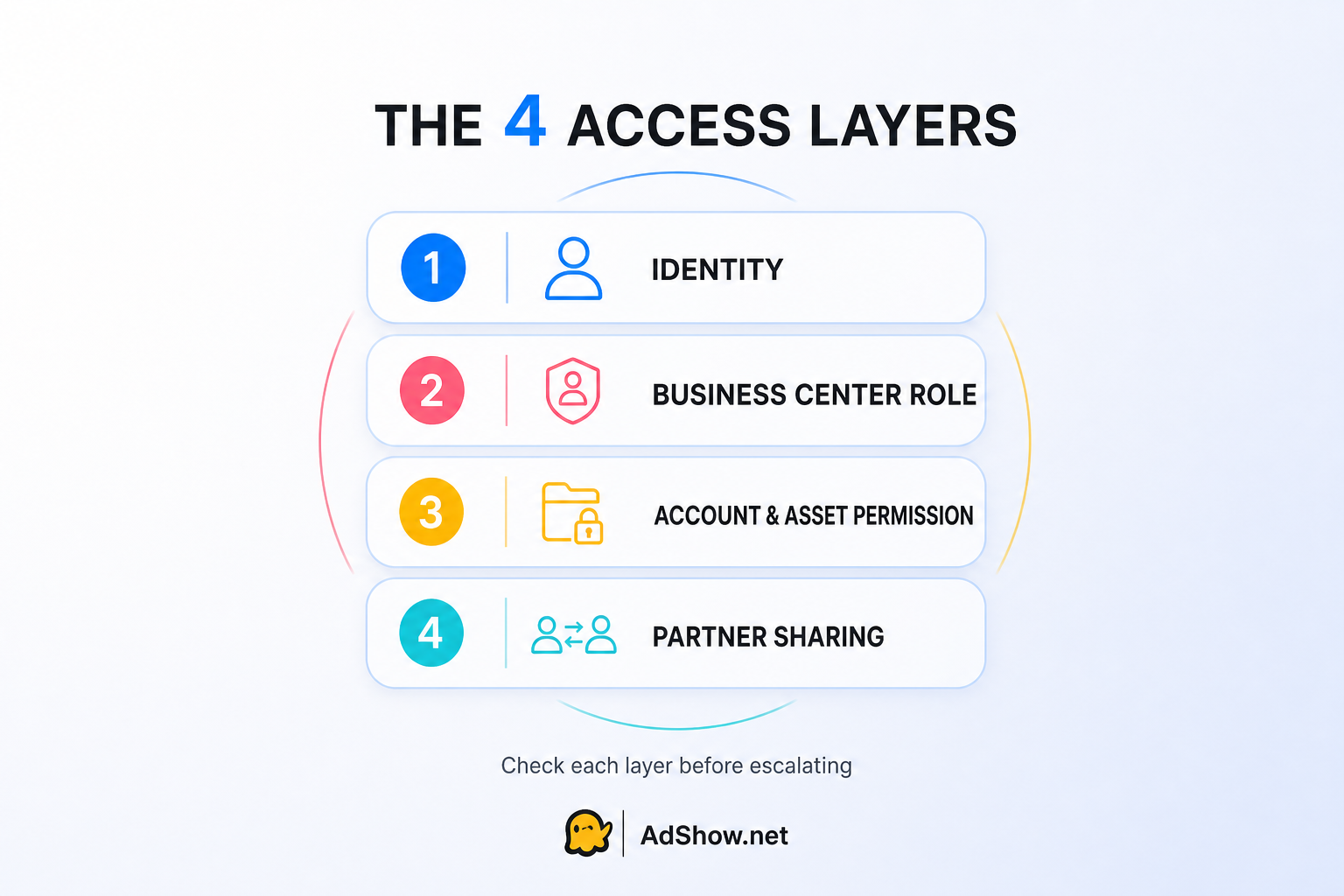
Troubleshoot identity, role, asset permission and partner sharing as separate layers.
Before changing permissions, map the problem across four separate layers.
Identity access
This is the TikTok for Business identity used to log in. It depends on the connected email address, phone number, password, linked sign-in method and two-step verification.
TikTok’s password-recovery documentation says that a user who cannot access the registered email address or phone number cannot use the normal reset flow. That makes recovery-channel ownership a business-continuity issue, not merely a personal preference.
Use a company-controlled email address, keep recovery information current, enable two-step verification and never make password sharing the normal agency workflow. When a person leaves, disable or remove their individual access rather than changing a shared password that many people know.
Business Center role
TikTok separates basic roles into Admin and Standard.
An Admin has broad access to Business Center functions and can manage members, partners, accounts and assets.
A Standard member works only with the accounts and assets assigned to that person.
Finance access is an additional permission layer. TikTok documents Finance Analyst and Finance Manager roles for viewing or managing financial information. A campaign buyer does not automatically need the ability to manage payments, and a finance analyst does not automatically need control over campaign assets.
This separation lets a company avoid the lazy—but risky—solution of giving everyone Admin access whenever something is missing.
Account and asset permission
After adding a member, an administrator must grant access to the appropriate accounts and assets. Depending on the business, that may include advertiser accounts, TikTok accounts, Pixels, audiences, catalogs, Shops, leads and TikTok One resources.
Permissions vary by asset. For a TikTok account, the difference between delivering ads and managing the profile affects what an operator can publish or change. Grant the narrowest permission that supports the role.
Partner relationship
Partners are organizations outside the company, such as an agency. TikTok allows a Business Center Admin to add a partner using a Business Center ID or, in some workflows, an ad account ID, and then assign specific accounts and assets.
Adding the partner is only the first half of the task. The administrator must still choose what to share and at what permission level. This is why “the agency is already listed under Partners” does not prove that the agency can see the Pixel or operate the correct ad account.
Partner access is preferable to sharing a personal or company login because it creates a clearer organizational boundary and a cleaner offboarding path.
Build a safer access structure
1. Remove the sole-admin failure point
TikTok’s security guidance recommends at least two Business Center Admins to reduce the risk of losing access. Use two or more legitimate, company-controlled administrators, but do not make every buyer an Admin.
Choose administrators who can verify the business relationship and respond during an incident. Confirm that their email, phone, authenticator and linked accounts remain under company control.
2. Apply least privilege to day-to-day operators
Give buyers and analysts Standard access, then assign only the ad accounts and assets they need. Upgrade a role only when a documented task requires it.
If a user cannot see an asset, first check assignment. Do not immediately solve the problem by granting Admin access. That may expose unrelated advertiser accounts, Pixels, audiences and finance controls while masking the original configuration error.
3. Separate campaign, profile and finance duties
A person who launches ads may not need to publish organic posts. A creative partner using Spark Ads may not need billing access. An accounting colleague may need invoice visibility without the ability to edit campaigns.
Write down the role before assigning the permission: campaign operator; organic content manager; data and tracking owner; finance manager or analyst; security/recovery administrator; or external agency partner.
4. Use partner sharing for agencies
Ask the agency for its Business Center ID and share only the required assets. Confirm both sides can see the relationship, then test access using an actual agency member—not only the client administrator’s view.
Never send passwords in chat as a substitute for configuring partner access. It becomes difficult to prove who performed an action, and offboarding requires changing credentials across people and tools.
5. Map asset control before campaigns scale
Maintain a small asset register with the Business Center name and ID, advertiser account IDs, TikTok profile linkage, Pixel and catalog IDs, Shop connection, controlling organization, members and partners, billing owner, and primary and backup administrators.
Do not wait until the Pixel disappears from an ad group or an agency contract ends. Asset mapping is easiest while every party is still cooperating.
6. Review access on a schedule and at every handover
TikTok advises businesses to review access, check unauthorized changes, remove inactive users and validate members and partners. Review administrator and finance access monthly, all members and partners quarterly, and the complete structure immediately after a staff or agency departure or any suspicious activity.
7. Prepare evidence before an incident
Keep a restricted recovery file containing Business Center and account IDs, company registration evidence, billing records, screenshots of legitimate ownership or partnerships, approved contact details and a timeline template.
Do not store passwords or one-time authentication codes in that file. Its purpose is to support identification and escalation—not to create another credential leak.
Why a Pixel or ad account may not appear
When an asset is missing, work through this order:
Confirm the active identity. Check the email or login method rather than relying on the displayed name.
Confirm the active Business Center ID. Similar names can hide the fact that a user opened the wrong organization.
Confirm membership status. Verify that the invitation was accepted and the person remains active.
Confirm the basic role. Determine whether the person is Admin or Standard.
Check direct asset assignment. A Standard member needs the relevant account or asset assigned.
Check partner sharing. For an agency, verify that the partner exists and the specific asset was shared to it.
Check where the asset lives. Record the Business Center or ad account that controls the Pixel, account, catalog or Shop.
Check platform status. A lock, suspension or verification issue is different from a permission issue.
Capture IDs and screenshots before escalation. Identify the user, Business Center, asset and exact missing action.
For Pixels, take extra care before unsharing. TikTok’s current Pixel-sharing guidance states that removing a shared Pixel can prevent an ad account from using it for new ads and can pause existing ads that rely on it. Treat Pixel access changes as campaign-impacting work, not routine cleanup.
A 15-minute TikTok Business Center access audit
Minutes 0–3: identity and recovery
Verify the primary and backup administrators.
Confirm company control of their email addresses and phone numbers.
Confirm two-step verification is enabled.
Remove shared-login practices from the normal workflow.
Minutes 3–6: members and partners
Review the member list.
Remove inactive or unknown users.
Review every external partner and its business purpose.
Confirm former agencies no longer have unnecessary access.
Minutes 6–10: assets
Match advertiser accounts, TikTok accounts, Pixels, catalogs and Shops to the asset register.
Confirm each operator can see only the required assets.
Check whether Spark Ads and profile permissions match the intended workflow.
Minutes 10–13: finance
Identify Finance Managers and Finance Analysts.
Remove finance access from people who no longer need it.
Confirm the billing owner and escalation contact for every active advertiser account.
Minutes 13–15: recovery test
Locate Business Center and ad account IDs without relying on one person.
Confirm the backup administrator can log in.
Confirm the team knows how to contact TikTok for Business support.
Record the audit date and owner.
What to do if access is already lost
Secure the connected email, phone and linked sign-in accounts.
Reset the TikTok for Business password through the official flow if recovery channels remain accessible.
Review recent members, partners, permissions and financial activity from any legitimate Admin session still available.
Remove unauthorized access only after preserving IDs, screenshots and timestamps needed for investigation.
Pause or contain affected advertising activity where authorized and operationally necessary.
Contact TikTok for Business support or the assigned account manager with the Business Center ID, ad account IDs, affected identity and incident timeline.
Follow TikTok’s official review or reactivation instructions if an account or Business Center is locked or suspended.
TikTok states that it may suspend a compromised account to prevent further access while investigating. Do not interpret that security action as proof that every campaign, balance or asset will be handled identically. Account status, asset control and provider terms must be checked separately.
Where a TikTok agency ad account fits
A TikTok agency ad account can be part of a media buyer’s advertising infrastructure, but it does not replace Business Center security or client-owned asset governance.
AdShow provides TikTok agency ad accounts, alongside Meta/Facebook, Google Ads and other major agency advertising accounts, through a self-service dashboard. Users can review available packages, request accounts, manage balances and top-up workflows, and monitor operational status without running every routine task through chat.
Before connecting any advertising account, document who controls the Business Center; which TikTok profile, Pixel and catalog will be shared; the permissions the buyer receives; the funding and balance workflow; and what happens during restriction, replacement or offboarding.
You can review the current TikTok agency ad account options on AdShow. An agency account should support a well-controlled workflow; it should never be positioned as a way to evade TikTok policy or enforcement.
For the broader operational distinction, see our guide to what happens to balances, campaigns, Pixels and replacement processes after an agency ad account is suspended.
Questions media buyers repeatedly ask about TikTok Business Center
The following questions reflect recurring concerns found in public media-buying forums and Reddit discussions about TikTok Business Center, partner access and missing assets. The answers are checked against current TikTok Business Help Center guidance, but the exact resolution can still depend on ownership, permissions, region, product availability and account status.
Why can I log in to TikTok Business Center but see no ad account?
Does adding an agency as a partner automatically share every asset?
Should every media buyer be a TikTok Business Center Admin?
Can an agency manage TikTok ads without receiving the client’s password?
Why is my TikTok Pixel missing even though I can see the ad account?
Will two-step verification prevent every Business Center takeover?
Can a backup Admin reverse a TikTok suspension?
Does a TikTok agency ad account protect my Business Center from hacking?
Final takeaway
The most dangerous TikTok Business Center failure is rarely “someone forgot where the login page is.” It is discovering during an incident that nobody knows which identity controls the organization, which Business Center holds the asset, or whether an agency was actually assigned the permissions needed to keep campaigns running.
Use multiple legitimate administrators without making everyone an Admin. Separate identity, Business Center role, asset permission and partner access. Keep finance rights narrow. Map Pixels and profiles before scaling. Test recovery while the system is healthy.
That structure cannot guarantee protection from compromise or enforcement. It can make access easier to audit, incidents easier to explain and agency handovers less dependent on passwords and chat history.
When your team is ready to evaluate self-service advertising-account infrastructure, review AdShow’s TikTok agency ad account options or create an AdShow account.