Facebook Ads Active but Not Spending? Diagnose It in Order
Facebook ads active but not spending? Check delivery status, schedule, limits, payment, audience, bids, optimization and account health.

August 13, 2026
Table of contents
If Facebook ads are active but not spending, “Active” may describe only one level of the structure. Meta notes that a campaign can appear active while its ad set or ad is still in review. Check delivery at campaign, ad-set and ad level, then verify the schedule, spending limits, available funds or payment method, audience and bid constraints, optimization event and account status—in that order.
Do not duplicate campaigns repeatedly or replace an account before identifying whether the block is campaign-level, billing-level or account-level.
Use this ten-minute triage first
Inspect Delivery for the campaign, ad set and ad.
Confirm start date, timezone and schedule.
Check account and campaign spending limits.
Open Billing & payments and verify usable funds or the default payment method.
Check Account Quality and unresolved verification prompts.
Review audience size, placements, cost controls and bid strategy.
Confirm the optimization event can be measured and is appropriate.
Use Activity History to find recent changes.
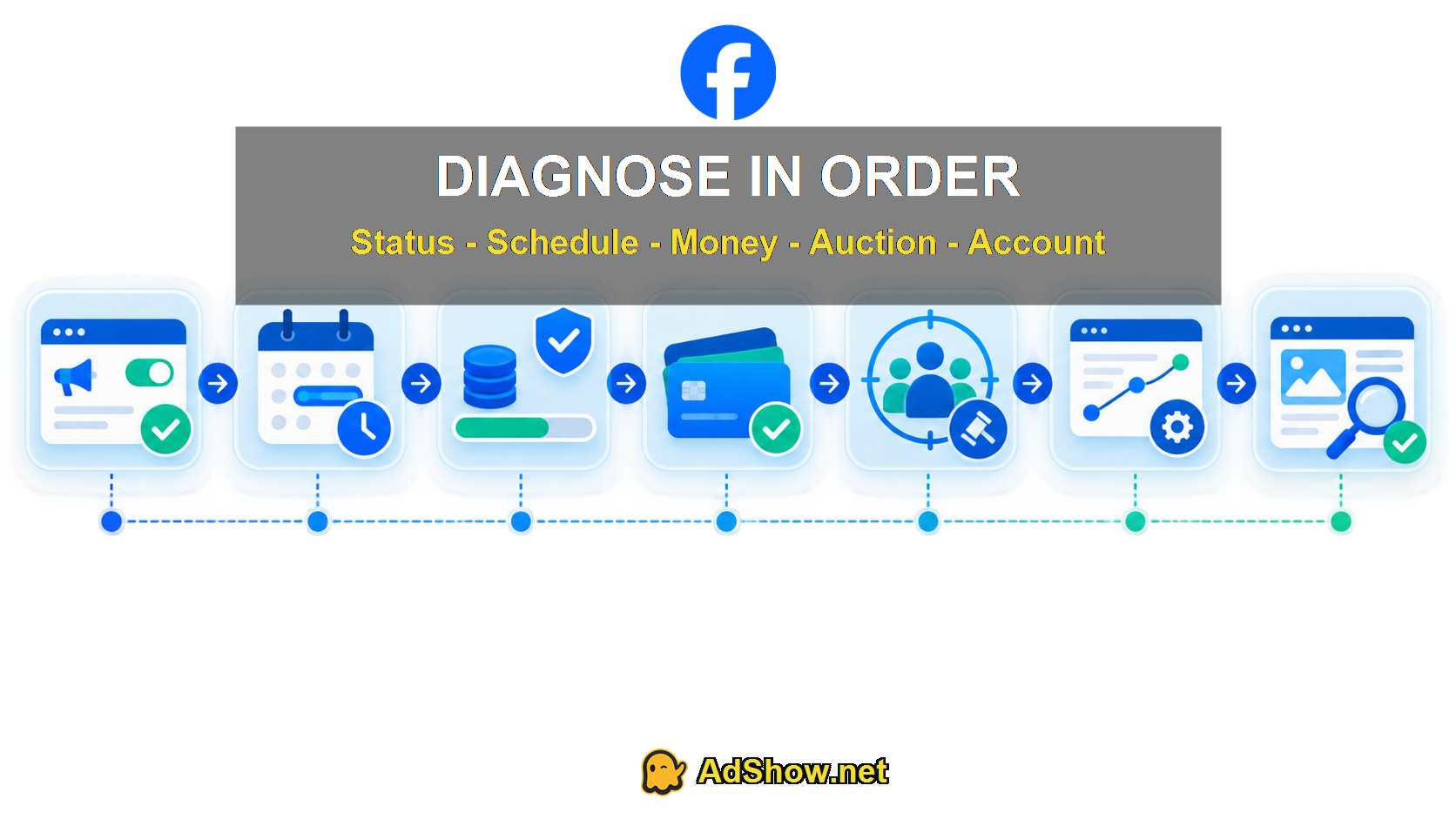
Move from status and schedule to billing, auction inputs and account health before changing infrastructure.
Why can a campaign say Active with zero spend?
The ad or ad set is not active
Meta displays delivery statuses at multiple levels. Expand all three. Recent edits can return an ad to review even when the campaign toggle remains on.
The schedule has not started
Check the ad account timezone, scheduled start and dayparting. A timezone mismatch often looks like a delivery failure.
A spending limit is blocking delivery
Review both account and campaign limits. A campaign budget does not override an exhausted account limit.
The visible balance is not usable
Available funds, promotional credit, outstanding charges and a provider wallet are different. Recent public discussions describe advertisers seeing funds while the account still requests a payment method or remains restricted. Those reports are symptoms, not proof of one universal Meta bug.
The audience or bid cannot win
Very narrow targeting, exclusions, low bids or aggressive cost controls can prevent impressions. Compare estimated audience, placements and bid controls before increasing budget.
The optimization event is too sparse
A new account optimizing immediately for a rare conversion can struggle to enter or win auctions. Do not assume that changing to engagement is a universal fix; choose an event aligned with the real objective and available signal.
The account or asset has a review issue
Check Account Quality, business verification, Page status, payment verification and the landing page. A campaign-level change cannot solve an account-level restriction.
Harris Eugene’s operator note
“The costly mistake is changing five variables at once. I use a top-down test: status, time, money, auction, signal, account. Recent Reddit threads show buyers duplicating campaigns, broadening audiences and swapping cards before they know which layer is blocked. That destroys the evidence. Capture the original setup, change one cause at a time and wait long enough for review and reporting to update.”
— Harris Eugene, summarizing a diagnostic method informed by current Meta documentation and recent public discussions. No specific client result is being invented.
What should you change—and what should you leave alone?
If a lower-level object is in review, wait for that review rather than rebuilding everything.
If the schedule is wrong, correct only the schedule.
If an account limit is reached, update or remove it with authorized access.
If payment failed, resolve billing and avoid repeated card attempts that add noise.
If targeting is extremely narrow, loosen the constraint you can justify.
If a cost cap is unrealistic, test an appropriate bidding setup.
If Account Quality shows enforcement, follow the stated review process.
If payment failure is the symptom, use the Facebook payment-failure diagnostic. If the account is disabled rather than merely not delivering, follow the disabled-account recovery checklist.
Collect an evidence pack before contacting support
Capture the campaign, ad-set and ad delivery columns in one view; the ad account ID; account timezone; scheduled start; account and campaign spending limits; Billing summary; payment status; Account Quality; audience estimate; bid strategy; optimization event; and the last meaningful change in Activity History. Remove personal payment details before sharing screenshots outside the authorized team.
Describe the issue with exact times and states: “Campaign active at 09:00 UTC, ad approved, zero impressions by 15:00 UTC, usable balance visible, no account restriction shown.” That is more actionable than “Meta is not spending.” If the status changes while the case is open, add the new screenshot to the same case instead of creating duplicates.
Once delivery starts, document which single action preceded the change—but avoid calling correlation a proven cause. Some reviews and billing processes resolve asynchronously.
When should you consider another account workflow?
An agency account is relevant only after diagnosis shows a genuine operational or account-level need and the advertiser remains eligible to advertise. It is not a fix for a rejected ad, broken Pixel, impossible bid or noncompliant destination. If you need a documented self-service workflow, review the current Facebook agency ad account offer, including eligibility, fees and support terms.
Questions collected from recent advertiser and support discussions
How long should I wait when a new Facebook ad is active but not spending?
First confirm the ad itself is approved and scheduled. Reviews and reporting can take time, but use the actual delivery status rather than a fixed universal waiting period.
Should I duplicate the campaign?
Not as the first step. Duplicating can restart review and obscure the cause. Diagnose status, schedule, billing and account health first.
Can a prepaid balance exist while Facebook ads do not spend?
Yes. Delivery can still be blocked by payment verification, account status, schedule, audience, bidding or review. Confirm that the balance is usable inside the correct ad account.
Will increasing the budget force delivery?
No. A larger budget cannot override review, account limits, payment problems or restrictions. It helps only when budget or auction competitiveness is the real constraint.
Does zero spend mean the Facebook ad account is disabled?
No. Zero spend is a symptom. Check Delivery and Account Quality to distinguish campaign configuration from account-level enforcement.
Research note: This guide uses Meta’s delivery-status and billing documentation plus public advertiser discussions from the last 12 months. Community fixes are treated as individual reports, not universal instructions.