Meta Account Restricted After Duplicating Ads? Do This First
If a Meta account becomes restricted after you duplicate ads, the timing does not prove that duplication alone caused the restriction. Duplicating an ad can trigger a fresh review, and Meta says ads may be reviewed again even after going live. The review can consider creative, text, targeting and the destination—not merely the duplicate action.

August 14, 2026
Table of contents
The practical response is to stop multiplying variants, identify exactly which asset is restricted, and audit the full chain: user, Business Portfolio, ad account, Page, creative, destination and connected assets. Then submit one evidence-based review through Business Support Home if the decision appears incorrect.
Does duplicating a Meta ad cause an account restriction?
There is no reliable basis for a universal rule that one duplicate causes an account ban. Meta’s published review guidance says edits to targeting, creative, optimization or billing events may result in another review. It also says ads can be reviewed again after they are live. A duplicate is a new ad object and can therefore expose the copied material to a new review decision.
Meta separately states that advertising restrictions may relate to severe or repeated policy violations, attempts to evade review or enforcement, inauthentic accounts, or connections to abusive assets. That makes scope important. An ad rejection is not the same as an ad-account restriction, and an ad-account restriction is not automatically a restriction on the user, Page or Business Portfolio.
AdShow operator note: Preserve the change history before touching anything else. Creating ten more copies, changing the landing page and removing admins before recording the restricted entity destroys the cleanest evidence.
First identify the scope of the Meta restriction
Open Business Support Home and Account Quality, then record the wording and affected entity. Ask these questions in order:
Is one ad rejected? The issue may be creative, copy, targeting or destination-specific.
Is the ad account restricted? Campaign delivery across that account may be affected.
Is the user restricted from advertising? Changing ad accounts will not repair the user’s status.
Is the Page or Business Portfolio restricted? Connected accounts and assets may remain unusable until that scope is resolved.
Is there a security alert? A compromised admin or unfamiliar activity needs containment before a policy appeal.
Take screenshots that include the entity name or ID, restriction text and timestamp. Do not rely on the email subject alone; phishing messages often imitate Meta enforcement language.
Audit what the duplicated ad carried with it
Creative and copy
Compare the duplicate with the source ad. Check claims, before-and-after implications, personal-attribute language, prohibited products, sensational formatting and any text generated or modified during duplication. If the source ad was already borderline, a second review can produce a different outcome without proving that duplication is itself prohibited.
Destination and redirect chain
Load the final URL on mobile and desktop, with and without tracking parameters. Verify redirects, domain consistency, page content, forms, checkout, privacy disclosures and scripts. Review systems evaluate the destination as well as the ad. A changed page, injected script or geo-specific redirect can make the copied creative appear to be the trigger when the destination is the real difference.
Targeting and optimization
Duplicated campaigns often inherit exclusions, special-category settings, pixel choices and optimization events. Confirm that the new object did not change a regulated audience, country, age range, conversion location or billing event.
Account and asset history
Review recent rejected ads, removed admins, unfamiliar users, connected Pages and other business assets. Meta says restrictions can consider connected abusive assets or behavior similar to assets already removed. This does not mean every connection caused the decision; it means an isolated creative audit may be incomplete.
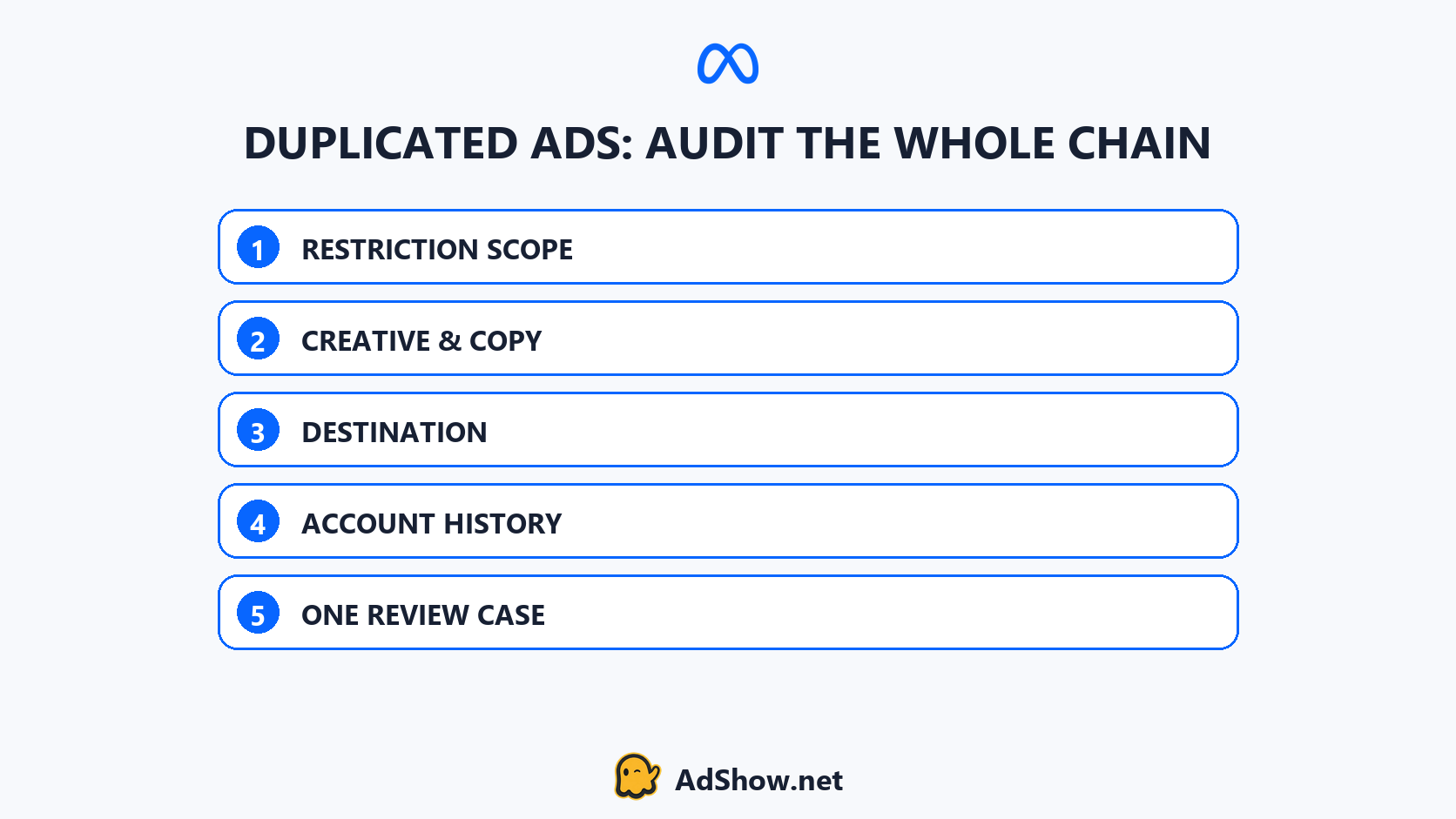
The appeal should follow an audit of restriction scope, creative, destination, account history and review evidence.
What recent advertiser reports show—and what they do not prove
Multiple recent advertiser reports describe restrictions appearing during bulk duplication or immediately after copied ads were published. One August 2026 FacebookAds thread asks about a restriction after duplicating ads; another recent report describes bulk duplication across a large account set before access was restricted.
These reports establish a recurring symptom, not proof that duplication itself is prohibited or that it was the sole cause. They are useful because they tell operators where to preserve evidence: the number of objects created, timestamps, copied creative, destination state, affected entity and any simultaneous admin or billing change.
What should you do in the first hour?
Pause additional duplication and bulk editing.
Record the exact restriction scope in Business Support Home.
Export or screenshot the source ad and duplicate settings.
Test the final destination and every redirect.
Review admin and security activity.
Separate policy evidence from delivery symptoms.
Correct confirmed issues, then follow Meta’s review path.
Avoid repeated, contradictory appeals. Do not create related accounts to work around an unresolved restriction. If the restriction is incorrect, present a concise timeline, affected IDs, what changed, what you inspected and what you corrected.
How this differs from an ad that is active but not spending
An explicit restriction is an enforcement or eligibility state. An active campaign with weak or zero spend may instead be constrained by auction, audience, bid, budget or learning conditions. Use the Facebook Ads active-but-not-spending guide when there is no restriction notice. For broader prevention, the Meta ad-account health checklist covers recurring operational mistakes.
When an agency account workflow becomes relevant
An agency account is not a bypass for a user, Page, business or destination that remains ineligible. Resolve the cause and preserve legitimate business assets first. If the advertiser remains eligible and needs a clearer process for account requests, top-ups and issue reporting, the operating model can still matter.
AdShow is a self-service platform providing agency advertising accounts for Facebook/Meta, Google Ads, TikTok and other major platforms. Eligible buyers can inspect current Facebook agency ad account options through the platform rather than running the entire account lifecycle through chat. Current terms and eligibility should be checked before requesting an account.
Questions collected from recent Meta advertiser discussions
Why did Meta restrict my account immediately after I duplicated an ad?
The duplicate may have entered a fresh review, but timing alone does not identify the cause. Audit the creative, destination, targeting, optimization, account history and exact restriction scope.
Should I delete the duplicated ads before requesting review?
Preserve evidence first. If Meta identifies a specific violation, correct it. Deleting objects immediately can remove context you need to compare the source and duplicate.
Can I create another ad account while the Meta restriction is active?
Do not use another account to evade enforcement. Meta explicitly considers attempts to evade review and connections between assets. Follow the stated review path and resolve the underlying scope.
Does an agency account prevent Meta restrictions?
No. Account type does not override Meta Advertising Standards or enforcement. The value of an agency workflow is operational management, not guaranteed approval or immunity from restrictions.
Sources and scope
A recent Reddit post reported a restriction after ad duplication. That individual sequence identifies a useful diagnostic question; it does not establish a universal Meta rule. Meta’s own documentation is used for review and restriction principles.